StockRoom: Stock Control the Whole Team Can Use
StockRoom is stock control for small business that runs on a phone. It is free to 50 products, and every paid plan includes your whole team.
StockRoom is the one product on this site you can open and use today. It is simple stock control with twelve screens, built so the person on the shelf, the person at the counter and the person who orders can all use it without training. This page says what each screen does, what the plans cost, and, just as plainly, what is not built yet.
- ✓ Free to 50 products, whole team on every plan
- ✓ Every count and change recorded: who, when, why
- ✓ Your data exported in full, any time
- ✓ Open today at stockroom.customaidashboard.com
Make this tool your own
- ✓ Describe the tool you want and preview what your dashboard will hold
- ✓ Confirm your email and leave a number so we can ring you back
- ✓ No card and no password to sign up
Price comparison
Here is what other inventory tools charge, read from each company's own pricing page, next to StockRoom's published plans. The tools count different things, so this is a map of what is listed, not a ranking.
| Option | Price | Read on |
|---|---|---|
| StockRoom (ours) | Free to 50 products; A$9, A$44 or A$89 a month; whole team included | Our pricing page, Australian dollars |
| Zoho Inventory | Free plan of 50 orders, 1 user; Standard A$43 a month, per organisation | 22 Oct 2026, A$ figure served to us |
| Katana | Free to 30 SKUs; paid plan is a custom contract, no price shown | 22 Oct 2026 |
| Sortly | Free to 100 items, 1 user; Advanced US$24 a month in year one (US$49 list) | 22 Oct 2026, US dollars |
| Fishbowl | Essentials A$345 a month billed annually | 22 Oct 2026, A$ figure served to us |
| Cin7 | Core Standard US$349 a month, by orders a year | 22 Oct 2026, US dollars |
| Odoo Inventory | One app free; all apps A$34.40 per user a month | 22 Oct 2026, per user |
| A spreadsheet | $0, and your time every week | 22 Oct 2026 |
| Custom AI Dashboard | StockRoom's plans are above and are in Australian dollars. Custom work is quoted in writing after a free 20 minute assessment. | |
Prices are as each supplier's page showed them on the day read, in the currency it showed, and nothing is converted. We make no claim about which is cheaper: it depends on your team and what you need.
What you get
Most small businesses start with a spreadsheet, and a spreadsheet is fine until two people edit it, or until the numbers on the sheet and the numbers on the shelf drift apart and nobody can say why. StockRoom replaces the sheet with a tool that records every change as it happens, so a difference is a fact you can look into rather than a mystery.
It is not a custom build. It is a finished product with fixed plans, which is why it has a price on this page when our custom work does not. If you outgrow it, or you need a connection it does not have yet, the custom side of the business starts with a free assessment and a written quote.
- ✓ Find, scan, count, receive, move, pick, buy, sell, optimise, automate, layout and overview screens
- ✓ Every stock change recorded with who, when and why
- ✓ Reorder points worked out from your own sales
- ✓ Cost of goods and a year end stock report for your accountant
- ✓ Shops, makers, trades and warehouses with real stock to count
- ✓ Teams where several people touch the stock
- ✓ Owners leaving a spreadsheet behind
- ✓ Not yet for anyone who needs a live link to eBay, Shopify, Square or Xero
What StockRoom is, and who it is for
StockRoom is stock control you open on a phone, a tablet or a desk computer. You list your products, say where they are kept, and from then on every delivery, sale, move and count changes the numbers and leaves a record behind. It is aimed at owner-run businesses with real stock: a shop, a workshop, a trade van, a small warehouse, a stall that trades at markets.
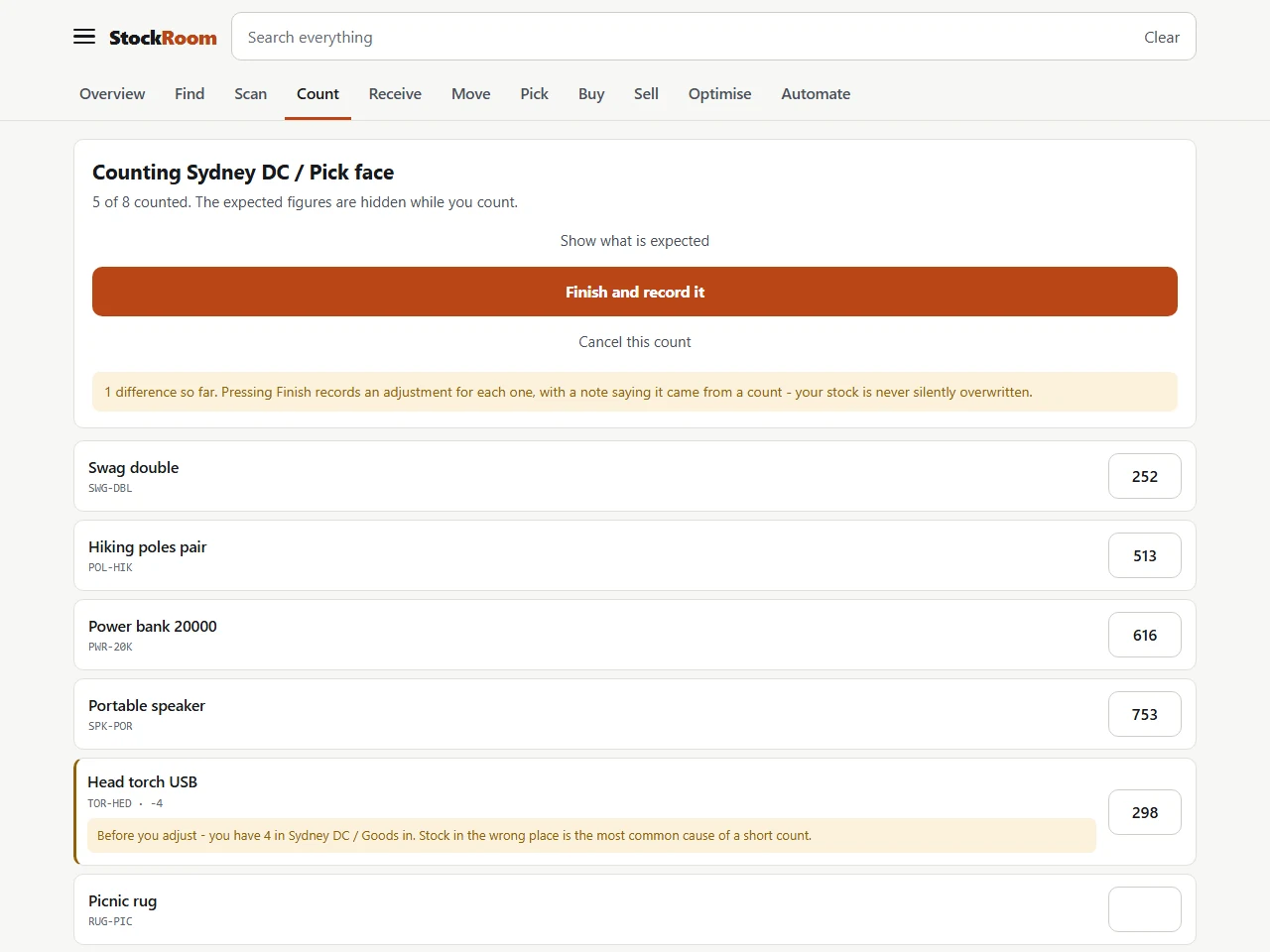
The picture above shows the screen people use most, the count. You count what is on the shelf, and StockRoom shows where your count disagrees with the system before it changes anything. A person reviews the differences and only then are they recorded. That one habit, look first and record second, is what keeps a stock number trustworthy.
You can open it now at stockroom.customaidashboard.com, start free, and bring your products in from a spreadsheet. If you are weighing it against other tools, our inventory software compared guide lists what each company charges.
The twelve screens, one job each
StockRoom is deliberately small. Each screen does one job, and the names say what the job is.
| Screen | What it does |
|---|---|
| Find | Shows where everything is and how much you have |
| Scan | Reads a barcode with the camera. Works in Chrome on Android and in Edge; on an iPhone, type the number or use a Bluetooth scanner |
| Count | Count a shelf and record what you actually find |
| Receive | Take a delivery in and record what actually turned up |
| Move | Move stock from one place to another and know it arrived |
| Pick | Gather an order in the order the shelves are in |
| Buy | Shows what is running out and how much to order |
| Sell | Record what went out of the door |
| Optimise | Shows what is not moving, and what it costs you |
| Automate | Sets a minimum for each product from your own sales, and says which place is due a count |
| Layout | A plan of your building to drag into place, what stands in each spot, stock held for orders and who else can see the account |
| Overview | Stock value, what is running low and the last 30 days of sales, with graphs |
Nothing on this list is a promise of a future feature. These twelve are what the app has today.
From a delivery to a reorder
Counting without breaking the numbers
A stock number is only useful if people believe it, and what decides that is how a count is written down. Some tools simply overwrite the quantity with your new figure and forget the old one. If the count was a mistake, the evidence is gone.
StockRoom treats a count as a comparison. It keeps the figure the system expected, the figure you counted and the difference, and it shows the differences for review before any of them are posted. Every change after that is recorded with who made it, when, and why. If a difference looks odd next month, there is a trail to follow.
This also lets you count one place at a time while the business keeps trading. The Automate screen tells you which place is due a count, so you count a little and often instead of closing the doors once a year. If you want the background on why this matters, our inventory management software guide goes through the questions to put to any supplier, and the business systems audit is the way to map your stock process before you change it.
Reordering from what you actually sell
Running out of a fast seller costs sales, and over-ordering a slow one ties up cash. The Buy screen lists what is running low and suggests how much to order. The Automate screen sets a minimum for each product from your own sales history rather than from a guess, so the warning moves as your trade moves.
The Optimise screen looks the other way. It shows what is not moving and what that stock is costing you to hold, so you can decide whether to discount it, return it or stop reordering it. The Overview screen puts stock value, low stock and the last 30 days of sales on one page with graphs.
None of this needs a data person. If you later want your numbers beside sales, accounts and jobs on one screen, that is the job of a custom dashboard or a KPI dashboard, and the automation page covers alerts that fire on their own.
Cost of goods and the year end report
Two things make stock matter to an accountant: what the stock cost you, and what you were holding on the last day of the financial year. StockRoom works out cost of goods from the costs you record on deliveries, and it produces a year end stock report your accountant can use.
That does not replace your accountant or your accounting package, and we give no tax advice. The report is a clean list of what you held and what it cost, taken from records that already carry a who, when and why. It saves the scramble of a count on the thirtieth of June, and it gives the person doing your books something firmer than a photograph of a shelf.
If your books are in an accounting package, note that StockRoom does not connect to one yet. The app lists Xero among its connections and marks it coming, so today the report is something you hand over, not a feed. Our accounting software pricing compared page shows what the packages cost.
Plans, and why the whole team is on every one
| Plan | Price | Limit |
|---|---|---|
| Free | A$0 | 50 products |
| Basic | A$9 a month | 400 products |
| Solo | A$44 a month | 2,000 products |
| Pro | A$89 a month | Unlimited products |
Every plan includes your whole team. Prices are in Australian dollars. Your data can be exported in full at any time, on every plan, including after you cancel. The plan sheet in the app also mentions locations (one on Free and Basic, five on Solo); what counts as a location is still being decided, so check the sheet before you rely on it.
The plans count products, not people. Many stock and job tools charge per person, so the bill climbs every time you hire a part-timer or a seasonal helper. Here the price follows the size of your range, and a bigger team costs nothing extra. See also our pricing page.
What is not built yet
We would rather say it than have you find out. The app lists twenty-one connections, including eBay, Shopify, Square, Lightspeed and Xero, and every one is marked coming: none can be switched on today. Some of the engines behind them exist, but nothing is customer-ready.
Also not inside StockRoom today: a recipe till for cafes and kitchens, a trade ordering page for wholesalers, lot numbers with expiry dates, and hire stock by date. Each is built or designed elsewhere but is not in the app. Serial numbers, bundles and cases, and Etsy and Amazon stock sync are on the same list.
If you need one of these, the pages for the planned editions say exactly what each one needs: StockRoom Retail, StockRoom Kitchen and StockRoom Wholesale. If you need a connection that does not exist yet, the honest options are to wait, to run StockRoom beside your till, or to have a link built for you through custom software.
Starting: bringing your products in
Save your stock list as a CSV file, which every spreadsheet program can do, then choose the file or paste it in. StockRoom shows you what it found before it writes anything, so a column in the wrong place is a thing you fix on screen, not a mess you clean up later.
A sensible first week is small. Import one category, count one shelf, receive one delivery and sell one item, and check each against the real shelf. If the numbers match, bring in the rest. If you are still on a spreadsheet and unsure whether you have outgrown it, our spreadsheet to app guide helps you decide, and fix messy spreadsheets covers tidying the list first.
Your products, counts and history belong to you. A full export is available any time on every plan, including after you cancel, so leaving does not mean losing your records.
A fair comparison: StockRoom, other tools, a spreadsheet, or a custom build
A spreadsheet. Free, familiar, and fine for a small range kept by one person. It stops working when several people edit it, or when you need to know who changed a number and why.
Other stock tools. Cin7, Zoho Inventory, Katana, Fishbowl, Odoo Inventory and Sortly are real products with different strengths: some connect to online shops and marketplaces today, which StockRoom does not. Their prices are in the table below, read on 22 October 2026. See Cin7 alternatives, Katana alternatives and Fishbowl alternatives, or the full inventory software pricing comparison.
StockRoom. A good fit when you want counting, receiving, moving and reordering done simply by a whole team, at a flat price, with no live shop connections needed.
A custom build. Worth asking about when no product fits, or when stock has to join up with your own systems; see rent or build for the sum, and inventory management software development for what a build involves. It starts with a free assessment and a written quote.
Areas we cover
We are an Australian business, StockRoom prices are in Australian dollars, and we also help clients elsewhere. If you want something StockRoom does not do, say which country you are in and what you need, and we start from there. The free 20 minute assessment is booked through get started, and any custom work is quoted in writing before it starts.
Related guides, prices and tools
- Pricing: StockRoom's plans in full
- Inventory software compared: stock tools side by side, with dates
- Inventory software pricing: what seven companies charge, read 22 Oct 2026
- Inventory management software: what to ask any supplier
- Inventory management software development: when to have stock software built
- Cin7 alternatives: other stock tools to weigh
- Katana alternatives: other stock tools to weigh
- Fishbowl alternatives: other stock tools to weigh
- Point of sale pricing: where sales usually get recorded
- Accounting software pricing: where the stock report ends up
- StockRoom Retail: what the shop edition will do, and when
- StockRoom Kitchen: what the food edition will do, and when
- StockRoom Wholesale: what the trade edition will do, and when
- Spreadsheet to app: when the sheet has become the system
- Custom dashboards: stock beside sales and accounts
- Custom software: built around how you work, quoted first
- Business systems audit: a written map of your systems
- Rent or build software: the break-even sum
- All our tools: what is open and what we are building
- Demand forecasting software: what to stock next, from your own sales
- AI builders for an online shop: plans, fees and limits
Begin with a free assessment
Two short steps. Name and email, and tell us what is slowing you down. No card, no obligation.
Create your account for a custom dashboard
- ✓ Tell us what to build and see what is inside your dashboard
- ✓ Your email confirmed, your phone number so we can ring you
- ✓ No card and no password to sign up
How we found these figures
- StockRoom plans and limits: Free to 50 products, Basic A$9 a month for 400 products, Solo A$44 for 2,000, Pro A$89 for unlimited, whole team included; as stated on our earlier StockRoom page and on our pricing page. Prices are in Australian dollars.
- Screens, scanning and what is not built: taken from our own earlier StockRoom page and from the StockRoom Retail, Kitchen and Wholesale pages. The twenty-one connections in the app are all marked coming.
- Other tools: Zoho Inventory, Katana, Sortly, Fishbowl, Cin7 and Odoo Inventory, read from each company's own pricing page on 22 October 2026, as set out on our inventory software pricing comparison. inFlow's pages could not be read, so no figure is given.
- Cost of goods and the year end report: described on our StockRoom product card. We give no tax advice.
- Our custom work: no price is published. The offer is the free 20 minute assessment, and any build is quoted in writing before work starts.
Answers to common questions
Is StockRoom really free?+
Yes, it is free up to 50 products, with your whole team included. The paid plans only start when your range grows past that, and you can export your data at any time.
Do I pay for each person who uses it?+
No, every plan includes your whole team, so hiring someone does not raise the bill. Many stock and job apps charge per person, which adds up as the team grows.
Can I bring my products in from a spreadsheet?+
Yes, save your stock list as a CSV file, which every spreadsheet program can do, and choose it or paste it in. You see what was found before anything is written, so mistakes are caught early.
Can I get my data out?+
Yes, you can take a full export at any time on every plan, including after you cancel. Your products, counts and history stay yours, so leaving never costs you your records.
Does StockRoom work with barcodes?+
Yes, the Scan screen reads a barcode with the camera in Chrome on Android and in Edge. On an iPhone you type the number or use a Bluetooth scanner instead.
Does it connect to eBay, Shopify, Square or Xero?+
Not yet. The app lists twenty-one connections and every one is marked coming, so none can be switched on today. We would rather tell you now than have you find out after you sign up.
How does a stock count work?+
You count a shelf and StockRoom shows where your count differs from the system before anything is recorded. A person reviews the differences, and each change is then kept with who made it, when and why.
What do the paid plans cost?+
Basic is A$9 a month for 400 products, Solo is A$44 a month for 2,000 products and Pro is A$89 a month for unlimited products. Prices are in Australian dollars and the whole team is included.
Can it help with my accountant at year end?+
Yes, StockRoom works out cost of goods from the costs you record and produces a year end stock report for your accountant. It does not connect to accounting packages yet, and it is not tax advice.
Can StockRoom run a cafe, a wholesaler or a hire business?+
Not fully yet. Recipes, trade ordering pages, lot numbers with expiry and hire by date are not inside the app today, and the Kitchen, Wholesale and Retail pages say what each edition still needs.
What if I need something StockRoom does not do?+
Ask us in the free 20 minute assessment, where we will say plainly whether to wait, use another tool or have something built. Any custom work is quoted in writing before it starts.