A Custom CRM Built Around How You Sell
A custom CRM keeps your leads, quotes and follow-ups in the stages and fields you already use, instead of bending your sales process to fit a ready-made product.
Most small teams should rent a ready-made CRM and get on with selling. This page is for the other case: your sales steps are your own, the fees have grown with the team, or the CRM has to sit inside the rest of your systems. It sets out what a custom CRM holds, what the rented ones cost, and how to decide which route is fair.
- ✓ Stages and fields named the way your team says them
- ✓ A next step and a date on every open deal
- ✓ Your data is yours, with a full export
- ✓ Free 20 minute assessment, any build quoted first
Build your dashboard with us
- ✓ Describe the tool you want and preview what your dashboard will hold
- ✓ Confirm your email and leave a number so we can ring you back
- ✓ No card and no password to sign up
Comparison prices
Here is what the usual CRM routes cost, read from saved supplier pages. A seat price is not a finished system: someone still sets up the stages, moves the data across and checks the results.
| Option | Price | Read on |
|---|---|---|
| A spreadsheet and a calendar | $0, and your time every week | No page read |
| HubSpot CRM (Sales Hub) | Starter US$7 or US$20 a month per seat; free for up to 2 users | 22 Oct 2026, US dollars |
| Salesforce Sales Cloud | Starter Suite US$25 a month per user | 22 Oct 2026, US dollars |
| Freshsales | Growth US$9 a month per user, billed annually | 22 Oct 2026, US dollars |
| monday CRM | Basic A$19 annual or A$24 monthly per seat, minimum 3 seats | 22 Oct 2026, Australian dollars as served |
| Custom AI Dashboard | Quoted in writing after a free 20 minute assessment, built for what you need. | |
Prices are as each supplier's page showed them on the day read, in the currency it showed. We make no claim about which is cheaper: it depends on your team and what you need.
How the service works
A CRM is a shared memory for who you are talking to and what happens next. The ready-made ones are built for an average seller. If you sell in a way that is not average, such as a site visit before every quote, a deposit before any work, or a referral partner who must be paid, you end up adding notes and workarounds until the tool is a spreadsheet with a login.
This is a decision page. It shows what a custom CRM would contain, where it earns its keep, what rented CRMs such as HubSpot and Salesforce charge according to the pages we have read, and what the alternatives are. We say plainly when renting is the better answer, because for most small teams it is.
- ✓ A pipeline in your own stage names
- ✓ Reminders for quiet deals, if you want them in the scope
- ✓ Quotes and invoices raised from the deal
- ✓ A count of where each lead came from
- ✓ Owners who sell in a way the ready-made tools do not fit
- ✓ Teams whose per-seat bill has grown with the headcount
- ✓ Businesses that need the CRM inside another system
- ✓ Not for a team of one or two with a simple process: rent a tool
What a custom CRM is, in plain words
A CRM keeps three lists. The first is people and companies, with every call, email and note attached to the right one. The second is deals, each sitting in a stage. The third is tasks, the small promises that move a deal to the next stage. A custom CRM keeps the same three lists, but you decide the stage names, the fields on each record and the rules for what happens next.
That is the whole difference. It is not a bigger or smarter product. It is the same memory, shaped to your trade. A cleaning company might track site, frequency and key location. A builder might track plans received, site visit booked, quote out and deposit paid. A recruiter might track role, candidate and fee terms.
If you are comparing the idea with a product you can rent today, our guides to CRM software and CRM software compared set out what the ready-made tools hold, and CRM development covers what building one involves.
A pipeline in your own words
The picture below is an example pipeline on made-up data. The stages are the ones a small trade business might use, and a different business would name them differently. The point is that the board reads the way your team talks, so nobody has to translate "qualified opportunity" into "I need to go and measure up".
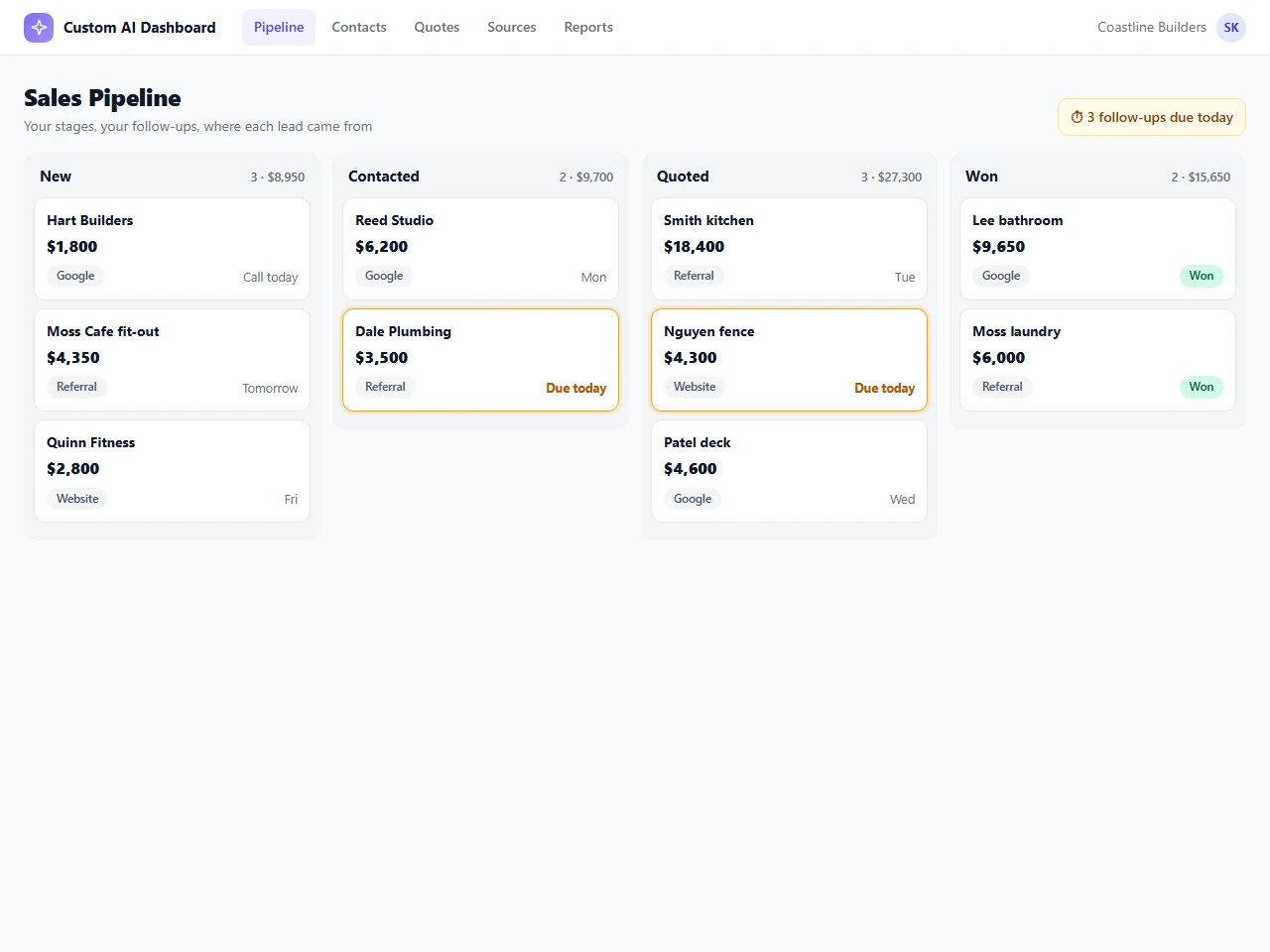
Each card carries a next action and a date. A stage with no due date is where deals go to be forgotten, so one thing worth agreeing in the written scope is a flag on any card that has had no contact for a set time. The gap, and whether it differs by stage, would be your decision and would be written down before the build.
The same board works on a phone, which matters if the person who takes the call is on a roof or in a van. A sales dashboard can then read the same records and show pipeline value and stalled deals on one screen.
What it keeps straight
We build around four jobs, in this order, and drop any that do not apply to you.
- The pipeline. Stages in your words, and a record for every deal that shows who owns it and what happens next.
- Follow-ups. A reminder for every lead that has gone quiet, sent to the person who owns it, with the history in front of them.
- Quotes and invoices. The deal turns into a quote and then an invoice without anyone retyping the address or the line items. If you want a first quote drafted for your review, see the AI quote assistant.
- Where leads came from. Search, referral, an advertisement or word of mouth, counted from the record rather than guessed on Friday afternoon.
Nothing is sent to a customer, and nothing is ordered or changed, until a person approves it. The CRM prepares and reminds. People decide.
When a custom CRM makes sense, and when it does not
Renting is the right answer for most small teams. The mature products are cheap per seat, they are tested by many thousands of other users, and someone else keeps them running. If a product fits, use it, and we will say so in the free assessment.
A custom one starts to make sense in four cases.
- Your process does not fit. You keep adding notes and spreadsheet columns to get around the tool.
- The per-seat fees have grown. Every product in the table below charges by the seat or the user, so the bill follows the headcount.
- It has to live inside another system. For example, the CRM must share records with your stock, jobs or customer portal, as in client portal software.
- You want to own it. You pay once for the build, you own the code we write once it is paid for, and you are not exposed to a supplier's price change.
It makes little sense for a team of one or two with a simple process, for a business that has not yet written down how it sells, or for anyone who wants a guarantee of more sales. A CRM records the selling. It does not do it for you.
What other CRMs cost
These figures come from each supplier's own page on the day we read it. They are in the currency the page showed, nothing is converted, and each one charges by a different unit, so this is a map of what is listed, not a ranking. Pipedrive and Zoho CRM are two other popular rented options, and we show no price for them here because we have no current reading to stand behind.
| CRM | Lowest paid plan listed | Charged | Read |
|---|---|---|---|
| HubSpot CRM (Sales Hub) | Starter US$7 or US$20 a month (the page does not say which is annual); free for up to 2 users | per seat | 22 October 2026 |
| Salesforce Sales Cloud | Starter Suite US$25 a month | per user | 22 October 2026 |
| Freshsales | Growth US$9 a month billed annually | per user | 22 October 2026 |
| monday CRM | Basic A$19 annual, A$24 monthly, minimum 3 seats | per seat | 22 October 2026, Australian dollars as served |
Add up your own seats before judging. Our CRM pricing compared guide and CRM software pricing post hold the wider table, and the Salesforce pricing post lists every tier. Onboarding, extra contacts and automation limits can sit outside the headline price, so ask what is in the plan.
What a build costs, and what we can say about ours
We publish no price, because the cost depends on how many stages, fields, rules and connections you need. Any build is quoted in writing before any work starts, and nothing begins until you agree.
We would rather give you a number you can hold us to than a range from somewhere else, so the quote names the scope, the connections and the running cost, line by line. A narrow CRM that does three jobs well will cost less than a platform that does thirty, and the written scope shows which one you are paying for.
There is also a running cost after the build for hosting and any connections, and the quote should show it with the working. Our rent or build guide gives the break-even sum, so you can test any quote, ours included, against five or ten years of seat fees.
From how you sell to a working CRM
How we build one, step by step
This is the usual shape of a build. It is not a promise about how long any stage takes, because that depends on your records and how quickly questions are answered.
- Free 20 minute assessment. You tell us how you sell. We tell you plainly if a rented CRM or a free plan will do.
- Map the process. One page showing the stages, who owns each, and what must happen before a deal moves.
- List the fields. Only what you will actually fill in. Fields nobody uses are the reason people stop updating a CRM.
- Quote in writing. The scope, the connections and the running cost, set out before work starts.
- Build and import. We build it and move your existing leads across, then check the counts match.
- Trial on real deals. You use it for a stretch, tell us what is wrong, and we adjust.
- Hand over. You get the working system, a short guide to using it, and a full export of your data.
If your leads live in a messy sheet first, fixing messy spreadsheets and data clean-up come before the import.
Moving your leads across
Most people start from a spreadsheet, an email folder or an existing CRM. An import from a spreadsheet or an export file is something to agree in the written scope: how the columns match your new fields, how the row counts are checked afterwards, and how duplicates are handled. Our aim is that duplicates are shown to you to decide on rather than deleted quietly, and the scope should say so.
Some history is harder to move than a contact list. Notes, attachments and email threads may not export cleanly from a rented product, so ask what the export contains before you commit, and keep a copy of everything you hold today. If the move is from a form on your website, form to spreadsheet shows the simplest way to catch enquiries as they arrive, and spreadsheet to app covers the case where the sheet has become the system.
Connecting the CRM to the tools around it is a separate piece of work. System integration and CRM automation describe how a web enquiry can create its own record, set the owner and add the first task, so nobody types a lead in twice.
Your data and your code
Your customer list is the most valuable thing a CRM holds, so the terms matter. Your data is yours, and you can export all of it whenever you ask, in a plain file you can open without us. You own the code we write for you once it is paid for.
Where the records are hosted matters, so ask for the hosting provider and the country to be named in the written quote before you agree. Privacy, consent and call recording rules differ between countries and we give no legal advice, so check the rules that apply to you, and see our privacy policy for how we handle what you send us.
Who can see what is another point to settle in the scope. A salesperson does not need to see payroll, and a contractor may only need their own jobs, so limiting access by role is worth asking for. Whatever is agreed should be written down at the start and revisited when your team changes.
Where AI fits, and where it does not
A CRM does not need AI to be useful. The basics are a list, a stage and a date, and they work without it. Where AI helps is the reading: sorting a free-text enquiry, summarising a long email thread, or drafting a reply for a person to approve.
If you want that, the AI lead qualifier sorts enquiries without losing good ones, AI email replies drafts answers for you to send, and AI agents sets out the wider idea. Anything that sends a message, spends money or changes a record waits for a named person to approve it, and every action is logged.
We make no claim that any of it will raise your sales. It saves typing and keeps follow-ups from slipping, and what you do with that time is up to you.
A fair comparison: a spreadsheet, a rented CRM, or a build
A spreadsheet and a calendar. Free, and enough while one person handles a short list of customers. It stops working when two people chase the same lead or when a follow-up depends on someone remembering.
A rented CRM. The sensible default for most small teams, with a free plan on several products. You accept that the structure is theirs. For help choosing and setting one up, see CRM implementation, CRM software compared and, for property agents, the real estate CRM and real estate CRM cost guides. Mortgage brokers have a mortgage broker CRM guide, and Follow Up Boss alternatives looks at a popular agent tool.
A CRM built with us. Worth a look when your process is unusual, when seat fees are climbing, or when the CRM has to share records with other systems. For a wider view of what we build, see custom software, dashboards and the business systems audit, which maps what you already pay for before you add or build anything.
Who this is for, and who it is not
It suits owner-run businesses and small teams of about two to fifty where selling follows a path of its own: trades and services that quote after a visit, wholesalers with repeat accounts, recruiters, advisers, installers and event suppliers. It suits people who can describe their selling steps in plain words and will use the system every day.
It does not suit a business that has not yet settled how it sells, because the CRM would only record the confusion. It does not suit anyone after a guaranteed result, or a one-person operation with a short list, where a spreadsheet or a free plan does the job. If a rented product already fits, rent it.
Related work is covered on our pages for back office automation, automated marketing and SEO automation, which handle the steps before and after the sale.
Areas we cover
We are an Australian business and we also work with clients elsewhere. Tell us which country's rules your customer records fall under, and we start from there. The free 20 minute assessment is booked through get started, and any build is quoted in writing before work starts.
Keep reading: guides and tools
- CRM software: the entry prices and a five seat sum
- CRM software compared: ready-made products side by side
- CRM pricing compared 2026: plans and limits, read 22 Oct 2026
- CRM pricing post: what six suppliers charge
- Salesforce pricing: every tier, read 22 Oct 2026
- CRM development: what building one involves
- CRM implementation: setting one up well
- CRM automation: leads that create their own tasks
- Sales dashboard: pipeline value and stalled deals on one screen
- AI lead qualifier: sorting enquiries without losing good ones
- AI quote assistant: first quotes drafted for review
- Spreadsheet to app: when the sheet has become the system
- Real estate CRM: a niche CRM for property agents
- Rent or build software: the break-even sum
- Custom software: built around how you work, quoted first
- Custom dashboards: your numbers on one screen
- Business systems audit: a written map of your systems
- Business software help: which tools to rent, fix, build or leave alone
- All our tools: what is open and what we are building
- Pricing: StockRoom's plans
- Case management software: every case in one place
Begin with a free assessment
Two short steps. Name and email, and tell us what is slowing you down. No card, no obligation.
Take the next step and sign up
- ✓ Tell us what to build and see what is inside your dashboard
- ✓ Your email confirmed, your phone number so we can ring you
- ✓ No card and no password to sign up
What these figures are based on
- Pipedrive and Zoho CRM: named as other rented options, with no price shown because we have no current reading.
- HubSpot, Salesforce, Freshsales and monday CRM: read from each supplier's own pricing page on 22 October 2026, as set out in our CRM pricing post and Salesforce pricing post. HubSpot's page did not say which of US$7 and US$20 is the annual price.
- Build prices: none shown. A custom build is quoted in writing before any work starts.
- Spreadsheets: no price page read.
- Our own prices: none are published. The only offer is the free 20 minute assessment; any build is quoted in writing before work starts.
Your questions answered
Do I need a custom CRM?+
Often not. If a ready-made product fits the way you sell, rent it, and we will tell you in the free assessment if one does. A custom build is worth a look when your process does not fit the tools.
Can you move our leads across from a spreadsheet?+
An import from a spreadsheet or an export file can be part of the scope. How columns map to your new fields, how the row counts are checked and how duplicates are handled are agreed in writing before the build, so you decide which record to keep.
What does a custom CRM cost?+
We publish no price, because it depends on the stages, fields, rules and connections you need. Any build is quoted in writing after the free 20 minute assessment, and nothing starts until you agree to the quote.
What do Pipedrive and Zoho CRM charge?+
We show no price for either, because we have no current reading to stand behind. Check each supplier's own pricing page for your seat count. The table on this page lists the suppliers whose pages we read on 22 October 2026.
Is a custom CRM better than HubSpot or Salesforce?+
We would not claim that, because those products suit many teams and have free or low entry plans. A custom CRM only makes sense when your process does not fit them or the seat fees have grown.
Who owns the CRM and the data?+
You own the code we write for you once it is paid for, and your data is yours with a full export whenever you ask. Ask for the hosting provider and country of your records to be named in the written quote.
Can the CRM send quotes and invoices?+
Yes, a deal can turn into a quote and then an invoice without retyping the details. Nothing is sent to a customer until a named person approves it, and each step is logged.
Can it work on a phone?+
Yes, the pipeline and the follow-up list are built to be used on a phone as well as a desk, which suits people who take enquiries on site. We check the phone view before handing it over.
Can it connect to my website forms and email?+
Usually yes, if the tools you use allow a connection, and that is a question to put to any supplier in writing. A web enquiry can create its own record, set the owner and add the first task.
Will it increase my sales?+
We cannot say, and we make no claim that it will, because any gain depends on your business and how you use it. It keeps follow-ups from slipping, and you can measure your own numbers.
How is it different from a spreadsheet?+
A spreadsheet holds what you type and forgets the rest. A CRM reminds the right person, keeps the history of each customer in one place, and lets two people work the same lead without overwriting each other.