The repeat admin that nobody should have to remember
Automation of repeat admin means alerts, confirmations, checks and reports fire by themselves on a form or a clock, and a person approves anything that sends money or a message.
Somebody fills in your form and nobody tells you. A customer waits for a confirmation that never comes. A page stops answering over a weekend. The Monday numbers get rebuilt by hand again. This guide covers the small jobs that fire by themselves, how each one is built, what it costs to run, and where a person must stay in charge.
- ✓ Alerts and confirmations on every form
- ✓ Checks that run on a clock, with a daily line
- ✓ Reports built from the records you already keep
- ✓ A person approves anything that sends or spends
Sign up to your own custom dashboard
- ✓ Describe the tool you want and preview what your dashboard will hold
- ✓ Confirm your email and leave a number so we can ring you back
- ✓ No card and no password to sign up
What other tools cost
Here is what the usual ways of automating repeat admin cost, from the pages already read for this site. A rented tool still needs someone to set it up and watch it.
| Option | Price | Read on |
|---|---|---|
| Reminders in your phone and a mail filter | $0, and your time every week | Our own note, 25 Oct 2026 |
| Zapier | Free 100 tasks a month; Professional US$19.99 a month billed annually, US$29.99 monthly, 750 tasks | zapier.com/pricing, 22 Oct 2026 |
| n8n | Starter EUR 20 a month billed annually, 2,500 executions; Community Edition self-hosted, not priced | n8n.io/pricing, 22 Oct 2026 |
| Make | Free plan of 1,000 credits a month; paid prices not shown on the page | Its own page, 22 Oct 2026 |
| Custom AI Dashboard | Quoted in writing after a free 20 minute assessment, built for what you need. | |
We hold no saved price for A consultant or agency, so none is quoted here.
Prices are as each supplier's page showed them on the day read, in the currency it showed. We make no claim about which is cheaper: it depends on your jobs and what you need.
The short version
Repeat admin is the small, regular work that keeps a business honest: telling the owner when an enquiry arrives, telling the customer it was received, checking that the website and the books still work, and sending the same weekly numbers to the same people. Each job is tiny. Together they eat a morning, and when one is forgotten the cost shows up later as a lost lead or a surprise.
This page covers the three kinds that matter most. Alerts and confirmations fire when something happens. Checks fire on a clock. Reports fire on a schedule and read your own records. It also says where each one goes wrong, what to ask before you pay anyone, and how this differs from the longer job chain described on the back office page.
- ✓ What an alert, a check and a report each do
- ✓ Where these jobs go wrong, and the fixes
- ✓ What to ask before you pay anyone
- ✓ How it differs from agents and the job chain
- ✓ Owners who find out about enquiries late
- ✓ Anyone retyping the same weekly numbers
- ✓ A business with a website or a booking form that must keep working
- ✓ Not for a business with a handful of enquiries a month: an email filter will do
The three jobs that suit automation
Repeat admin falls into three groups, and it helps to name them because each is built a little differently.
- Alerts and confirmations. Something happens, such as a form being sent, and a message goes out at once: one to you, one to the customer, sometimes a copy to a colleague. Related reading: form to spreadsheet and SMS reminders.
- Checks on a clock. A small program looks at something on a fixed rhythm and speaks up only when something is wrong or late. Examples are a page that stopped answering, a limit nearly reached, or a figure outside the range you set.
- Reports from your own numbers. The same summary, built from records you already keep, delivered to the same people on the same day. See report automation and custom dashboards.
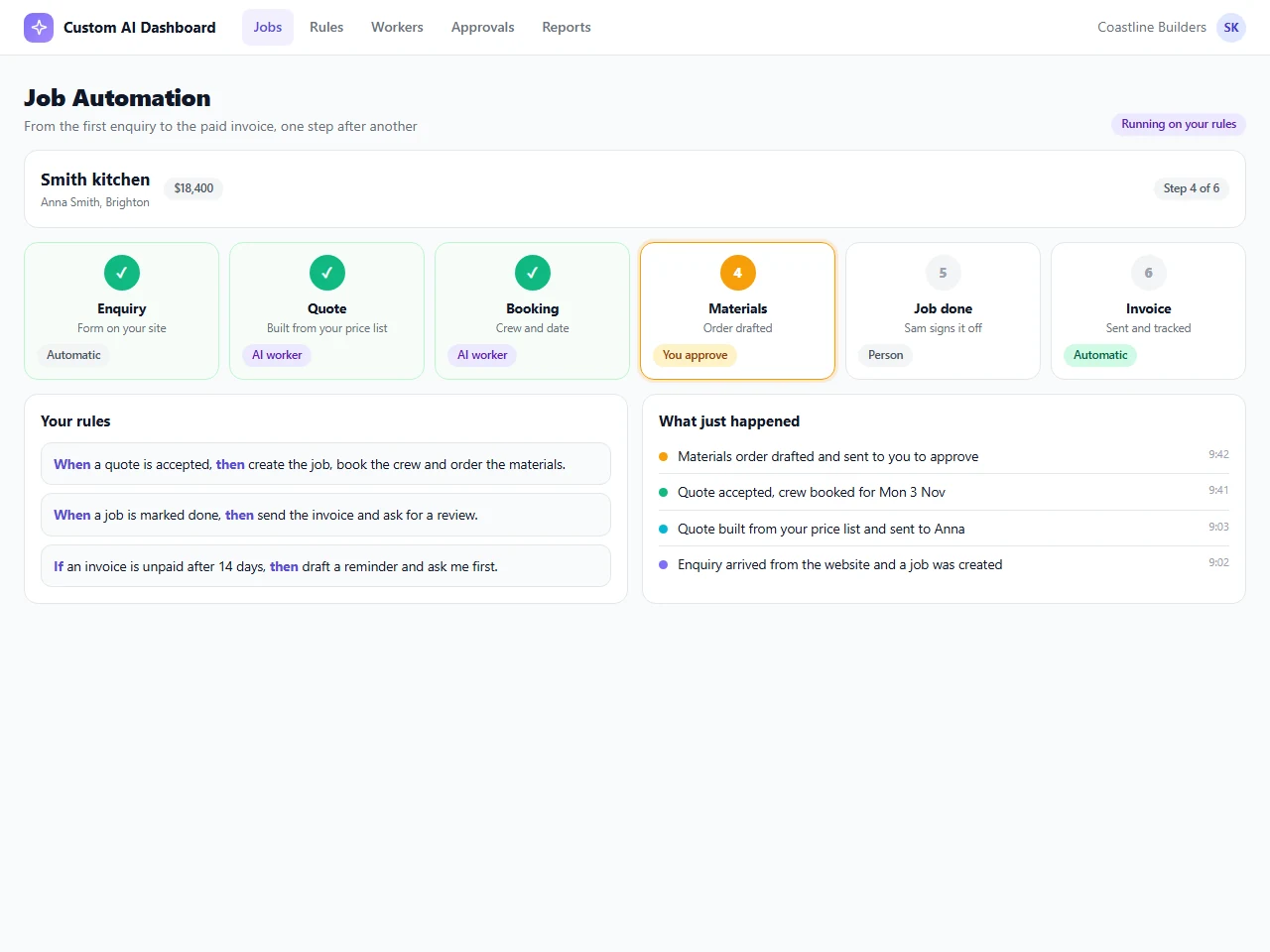
The picture above is an example on made-up data. It shows one job moving from enquiry to paid invoice by rules, which is the longer chain that the back office automation guide walks through step by step. This page stays with the short, single-purpose jobs.
Enquiry alerts and confirmations
An enquiry that sits unseen is the most expensive kind of forgetting, because the person who sent it is usually asking two or three businesses at once. An alert closes that gap. When a form is submitted, the row is saved to your list and a message reaches you straight away, with the name, the contact details and what they asked for.
The confirmation is the other half. The customer receives a short note saying it arrived and what happens next, written in your own voice. Nobody has to remember to send it, and the customer is never left wondering whether the form worked.
We run this on our own sites. One real test sign-up on our site saved a row and sent the alert, the confirmation and a copy, as recorded in our notes on 17 October 2026. That is a test of our own form, not a customer result.
A good version also copies a second person, keeps a log of what was sent, and shows the failed ones. See CRM automation for what to do with the list once it fills, and the AI receptionist for answering calls and messages when you are busy.
Checks on a clock
A check is the opposite of an alert. It fires because time has passed, not because something happened, and its whole value is that it stays quiet until it has something to say.
A well-made check looks at limits and at pages that stopped answering, writes one summary line a day and raises its hand only when something is wrong. The same pattern suits many small businesses, and its alerts go to the owner alone.
Things worth checking on a clock include:
- Whether your website, booking page or shop still loads.
- Whether a form still saves rows, tested with a harmless entry.
- Whether a number has crossed a limit you set, such as stock under a minimum or an invoice past due.
- Whether a scheduled job really ran.
Each check should do nothing when there is nothing to do. A check that fires for no reason trains people to ignore it, and a rented service that charges per run can cost money while achieving nothing. Ask for a rule that returns early when there is no work pending.
Reports from your own numbers
Most owners rebuild the same report by hand every week: sales, jobs done, invoices unpaid, stock low. A report job reads the records you already keep, builds the same summary each time, and delivers it by email or to a custom dashboard on the day you choose.
The records can live in a spreadsheet, an accounting package, a job app or a database. If they are messy, tidy them first: a report is only as good as the dates and names it reads. Data clean-up and fixing messy spreadsheets cover that step, and Excel automation covers the case where the spreadsheet is staying.
Two cautions. A report built from one source can disagree with the same report from another, so pick one source of truth and say which it is on the page. And a report that nobody reads is a cost, not a saving, so start with the one number you check first on a Monday and add others only when you miss them.
Where repeat-admin automation usually goes wrong
The clever part rarely fails. The plain parts around it do, and knowing them in advance saves a rebuild.
- The alert goes to a dead inbox. The address was typed once and the person left. Send alerts to a shared address, and test it when staff change.
- Spam or a test fills the list. A form with no protection will fill with junk, which hides the real enquiries. Add a simple check and keep a way to mark rows as test.
- The mail is marked as junk. Messages sent from a new address can land in a spam folder. Send from your own domain and test with more than one mail provider.
- A silent failure. A step stops and nobody notices. Every automation needs a daily line that says what ran and what did not.
- Two copies of the truth. The form list and the CRM disagree. Choose where the record lives and make the other copy a view of it.
- Rented tools that charge per run. A busy month costs more. Count your runs before you commit.
A person stays in charge of anything that sends or spends
Not every automatic job deserves the same trust. A message to yourself saying a form arrived is low risk. A message to a customer is a different matter, because it speaks in your name. A payment or an order is different again.
We design it with one rule. Nothing is sent, ordered or changed until a person approves it. Every message that leaves the business, whether a reply to a customer, a reminder or a confirmation, is drafted and waits. You see the draft with a plain button to approve, change or stop. An order, a payment to a supplier, a change of bank details or a refund waits for a person in the same way.
Checks and alerts to the owner are the part that may run on a clock, because they message only the owner and change nothing. They look, they log and they speak up when something is wrong. The same principle sits under AI agents and the AI workforce idea, where a worker prepares and a person decides. If you loosen a gate later, loosen one at a time, and keep the log that shows what happened.
How this differs from an agent and from the job chain
Automation follows fixed rules. If this happens, do that, every time, in the same way. That makes it predictable and cheap to run, and it suits tasks where the answer never changes.
An AI agent fits when the job needs a draft written for a person to approve, such as a reply to an unusual question or an order built from a messy email. The agent reads, drafts and waits. A rule cannot do that, because the input changes each time.
The back office automation guide covers the long chain from enquiry to paid invoice, where one step starts the next. Use this page for the short single-purpose jobs, and that one when you want to link the steps of a whole job together.
Many businesses end up with all three: fixed rules for alerts, an agent for drafts, and a chain for the main job. Start with whichever hurts most. The business systems audit writes down where the time goes, so that the first choice is made on facts.
Tools you might already own
Before building anything, check what you already pay for. Your form tool, accounting package, booking app or CRM may already send alerts, confirmations and reports. Turn those on first.
If it does not, three connector tools join apps by rules. Figures below are from pages already read for this site, in the currency each showed.
- Zapier: a Free plan of 100 tasks a month and two-step Zaps only; Professional at US$19.99 a month billed annually or US$29.99 billed monthly for 750 tasks. Read from zapier.com/pricing on 22 October 2026. See Zapier pricing 2026.
- n8n: Starter at EUR 20 a month billed annually for 2,500 executions, and a Community Edition you host yourself, with no price on the page. Read from n8n.io/pricing on 22 October 2026. See n8n pricing 2026.
- Make: a free plan of 1,000 credits a month; paid prices were not shown on the page we read on 22 October 2026.
All three side by side: workflow automation software compared. For help setting one up, see Zapier and Make setup, n8n automation and Make automation.
Build or rent
Rent when the job is common and a connector can join the apps you already own. A rented tool is cheap to start, someone else maintains it and the vendor's help pages teach a new hire.
Build when the rules are particular to you, when the price of renting grows with every run or every person, or when the steps cross tools that no connector joins well. A build runs on your own forms and records, and its cost is a quote rather than a meter.
Our custom work is quoted in writing before any work starts, and you own the code we write for you once it is paid for. Your data stays yours, with a full export. The sum for the choice is in rent or build business software, custom software describes how we build, and how much business software costs gives the dated prices for the tools around it. Pages and forms can be built together: see custom websites.
What to ask before you pay anyone
Whether you rent a tool, hire a freelancer or ask us, the same questions protect you.
- What exactly fires, and when? Ask for it in one sentence per job.
- Who gets the alert, and what happens when that person is away?
- What does it do when it fails, and how will I know? Insist on a daily line.
- What can it send without me seeing it? The only right answer is nothing: a person approves every outgoing message.
- Where does my data live, and can I take it with me? You want a full export.
- Who owns the code or the setup once I have paid? Ask in writing.
- What does it cost each month to keep running, and does that rise with use?
- What would you leave out? A good answer names a job that is not worth automating.
If you want a second opinion on an agency quote, see AI automation agency and Zapier expert. The software help assessment will also say when renting is the better answer.
From a free chat to jobs you can trust
Who this is for, and who it is not
It suits owners of small and mid-size businesses who take enquiries through a form, a booking page or a shared inbox, and who repeat the same follow-up by hand: trades, cleaners, clinics, workshops, wholesalers, local shops. It suits you if you learn of enquiries late, if confirmations depend on memory, or if the weekly numbers are rebuilt every Monday.
It does not suit a business with a handful of enquiries a month, where a mail filter and a reminder in your phone are enough. It does not suit a process nobody has agreed on: start with the business process automation guide and map it on paper. It does not suit anyone wanting software to make judgement calls on pricing or complaints. Those stay with you. If your need is a full set of linked tools, see system integration and the data platform.
Where we can help
We are an Australian business and work with owners across Australia. Tool prices on this page are in the currency each supplier's page showed, which is not always ours, and we do not convert them. Rules about email and text messages sent to customers differ by country, so check the rules where you operate before a confirmation goes out in your name.
Guides, prices and tools to read next
- Back office automation: the whole chain from enquiry to paid invoice, step by step
- Workflow automation: what to buy, ask and compare when repeat work should run itself
- Business process automation: map the process on paper before you automate it
- Report automation: the weekly numbers delivered without rebuilding them
- Invoice reminders: timing, wording and tools for getting paid sooner
- CRM automation: what to automate first in a customer list
- Form to spreadsheet: get form answers into a list without retyping
- SMS reminders: text messages that remind customers on a schedule
- Excel automation: when the spreadsheet is staying
- Workflow automation software compared: Zapier, n8n and Make prices side by side
- Zapier pricing 2026: plans and tasks read from Zapier's page
- n8n pricing 2026: plans and executions read from n8n's page
- Rent or build business software: the break-even sum worked through
- AI agents: workers that draft, with you approving
- AI workforce: giving AI workers a role and a task list
- Custom dashboards: your numbers on one screen
- Business systems audit: a written map of your systems
- All our tools: what is open and what we are building
Free assessment: tell us what you need
Two short steps. Name and email, and tell us what is slowing you down. No card, no obligation.
Take the next step and sign up
- ✓ Tell us what to build and see what is inside your dashboard
- ✓ Your email confirmed, your phone number so we can ring you
- ✓ No card and no password to sign up
Source of the numbers
- Zapier: Free plan 100 tasks a month, Professional US$19.99 billed annually or US$29.99 billed monthly for 750 tasks; zapier.com/pricing, read 22 October 2026, as in the Zapier post.
- n8n: Starter EUR 20 a month billed annually for 2,500 executions, Community Edition self-hosted with no price on the page; n8n.io/pricing, read 22 October 2026, as in the n8n post.
- Make: free plan of 1,000 credits a month, paid prices not shown; read 22 October 2026, as in workflow automation software compared.
- Our own sites: one real test sign-up saved a row and sent the alert, the confirmation and a copy (sites/cad-home/SITE.md, 17 October 2026). It is a test of our own form, not a customer.
- Searches, SpyFu GPT, read 25 October 2026: automate repetitive tasks 90 a month in the US; task automation software 90 (US); business process automation software 135 (US) and 36 (Australia). Australian figures for the others: no data.
- Our own prices: none are published. The free 20 minute assessment is the only offer, and any build is quoted in writing before work starts.
Frequently asked questions
What is automation of repeat admin?+
It is software that does small regular jobs by rules, such as alerting you to a new enquiry, confirming it to the customer, checking a page still works and sending the weekly numbers. A person approves anything that sends or spends.
Is there something ready-made I can try today?+
No, because this is built to order around your own forms and records, and nothing ready-made is open to try yet. The free 20 minute assessment is the first step, and any work is quoted in writing first.
How much does it cost?+
It depends on the job, so we quote in writing after a one-page scope and publish no price. Rented connector tools show their prices on this page with the day each was read, so you can compare.
Does anything send without a person seeing it?+
No. Every outgoing message is approved by a person first, who can approve it, change it or stop it. Only checks and alerts that message the owner alone may run on a clock.
Can it connect to the tools we already use?+
Usually it can, and we check each connection in the scope, because some tools limit what other programs may read or write. Where a tool refuses, we say so before any work is quoted.
What is the difference between an alert and a check?+
An alert fires because something happened, such as a form being sent. A check fires because time passed, such as once an hour, and it speaks up only when something is wrong or late.
What if the alert never arrives?+
That is why each job writes a daily line saying what ran and what failed, and why alerts go to a shared address that is tested when staff change. A silent failure is the main thing we design against.
Do you build this, or only advise?+
We build to order, and the first step is a free 20 minute assessment where we look at the admin job you repeat most. We also say plainly when renting a tool such as Zapier would do.
Will I own what you build?+
Yes. You own the code we write for you once it is paid for, and your data stays yours with a full export. Rented tools you use alongside it remain the supplier's, under their own terms.
How do I know it is worth doing?+
Time the task for two weeks, multiply hours a week by 52 and by what an hour of that person costs, and compare with the written quote. The back office guide shows the sum with an invented example.