Business Systems Audit
A business systems audit is a written report that maps your tools, spreadsheets and routines, shows what is duplicated, lost or slow, and ranks what to fix or build first.
Most small businesses run on a mix of an accounting package, a few spreadsheets, an inbox and someone's memory, and nobody has drawn it. This audit draws it. You list the tools and show us how a job moves, we map it and test the numbers where it matters, and you keep a written report that says what leaks and what to build first.
- ✓ A written map of every system and handover
- ✓ What is duplicated, lost or slow, named plainly
- ✓ A ranked list of what to build first
- ✓ Scoped and quoted in writing before we start
Get a dashboard built around you
- ✓ Describe the tool you want and preview what your dashboard will hold
- ✓ Confirm your email and leave a number so we can ring you back
- ✓ No card and no password to sign up
What the alternatives charge
Here is what the usual routes cost, read from saved supplier pages. A tool price is not an audit: someone still has to map how your work moves before a tool can fit it.
| Option | Price | Read on |
|---|---|---|
| A software health check from another provider | $800 flat, ending in a report and action plan; currency not stated | ok200.net, 22 Oct 2026 |
| Zapier Free | $0, 100 tasks a month, two-step Zaps only | 22 Oct 2026, US dollars |
| Zapier Professional | $19.99 a month billed annually, $29.99 billed monthly, 750 tasks | 22 Oct 2026, US dollars |
| Xero (accounting, US page) | Early US$27, Growing US$59, Established US$97 a month, flat per business | 22 Oct 2026 |
| ServiceM8 (job software) | A$29 a month flat, GST included, job cap | Australian page, 12 Oct 2026 |
| Tradify (job software) | A$48 per user a month, lowest plan, before GST | Australian page, 12 Oct 2026 |
| A DIY map with a whiteboard | $0, and your time | No price to read |
| Custom AI Dashboard | Scoped and quoted in writing before we start, after a free 20 minute assessment. No price is published. | |
We hold no saved price for An accountant's or IT provider's hourly rate, so none is quoted here.
Prices are as each supplier's page showed them on the day read, in the currency it showed. We make no claim about which is cheaper: it depends on your team and what you need.
About this service
Think of the audit as a survey before building work. You would not renovate a house without knowing where the pipes run, and you should not buy another tool or commission custom software without knowing where your information goes today. The audit finds the places where the same thing is typed twice, where an order or a lead falls between two tools, and where one person holds the whole process in their head.
It is a service, not a product. There is nothing to log into and nothing to install: you get a written report that you keep, and we go through it with you. The report also says where a ready-made product is the better answer, because we build software and a report that only ever recommended building would be a sales pitch.
- ✓ A map of every system, spreadsheet and handover
- ✓ What is duplicated, who types it and where
- ✓ What is lost between tools
- ✓ What to build first, in order, with what each fix involves
- ✓ Owners who suspect money or time leaks between tools
- ✓ Teams with sheets, a till, accounts and an inbox that do not talk
- ✓ Anyone about to buy a tool or commission a build
- ✓ Not for a business with a single system and nothing to join up
What a business systems audit is
A business systems audit is a structured look at how information and work move through your business. It covers the software you pay for, the spreadsheets that have quietly become systems, the routines people follow, and the handovers between them. It ends in a written report.
The question it answers is simple: where does the work go wrong, and what is worth fixing first? Search terms for the same idea include business process audit, workflow audit, software audit and tech health check. They overlap, and what matters is what you are handed at the end rather than what it is called.
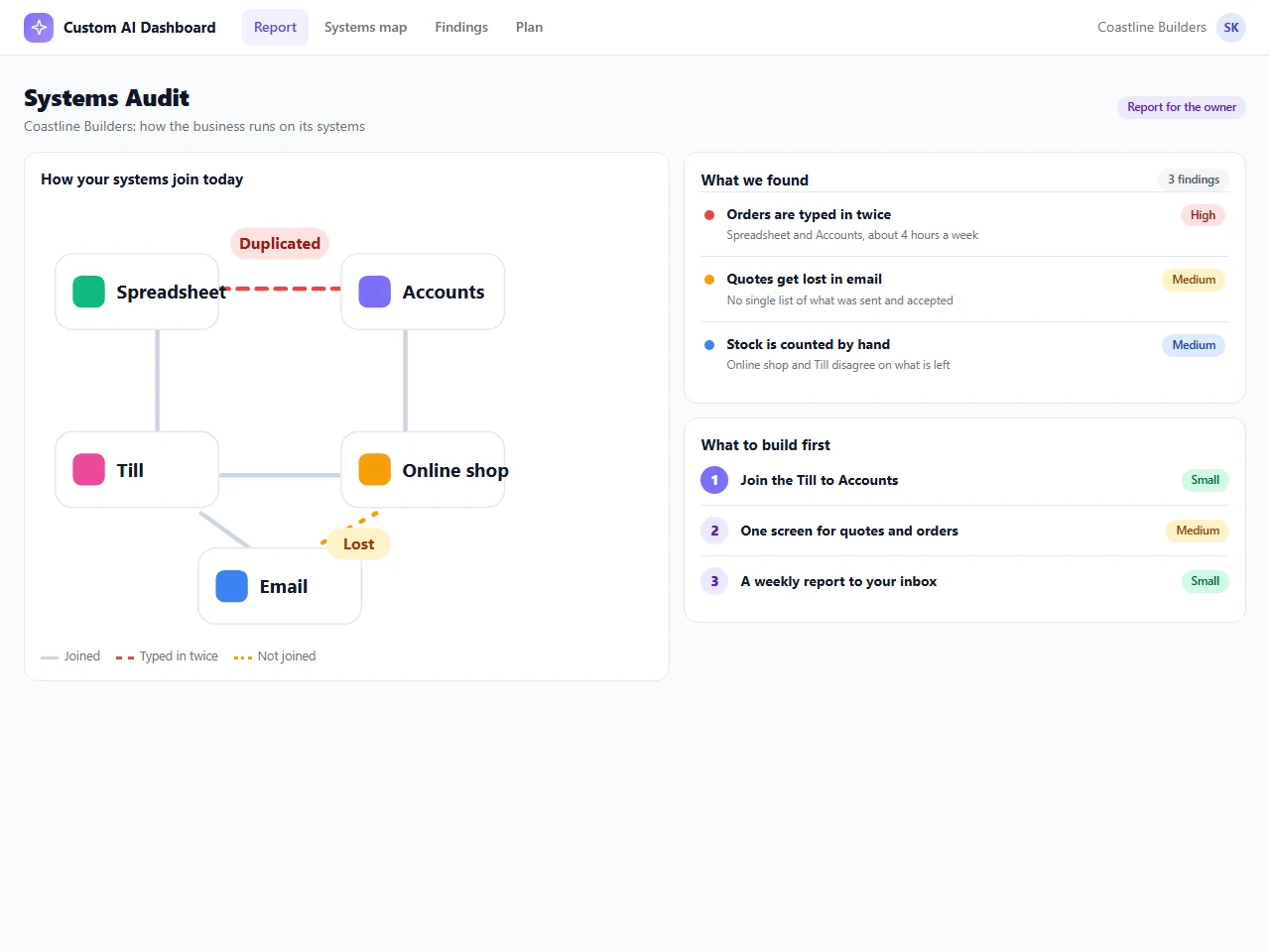
The example above is made-up data. Your report would show your own tools, your own handovers and your own ranked list.
What the report holds
The report has four parts, written in plain words so that anyone in the business can read it.
- A map. Every system, spreadsheet and handover, and what flows between them. Where information is copied by hand, the map says so.
- What is duplicated. The same customer, job or price typed in more than once, and who types it. Duplicates cost time and create two versions of the truth.
- What is lost. Orders, leads, invoices and follow-ups that fall between tools because nobody owns the gap.
- What to build first. A ranked list in order of what saves the most, with a plain description of what each fix would involve and whether a ready-made tool would do the job.
Where a number matters, such as the value of invoices that were never sent, we test it against your own records rather than estimating. If we cannot test it, the report says it is unknown.
Three steps
Signs you need one
Most owners know something is wrong long before they can say what. These are the signs we hear most often.
- The same job, customer or price is entered in two or three places, and they sometimes disagree.
- A quote goes out and nobody knows if it was accepted, because the reply sits in one inbox.
- You pay for several subscriptions and are not sure who uses which.
- One spreadsheet runs a part of the business, and only one person understands it.
- Month end means copying numbers from one screen to another before the accountant can start.
- You are about to buy another tool, or to commission a build, and want to know it is the right one.
If three or more sound familiar, the audit is likely worth doing. If only one does, the free 20 minute assessment may be enough, and we will say so. Our business software help page covers the shorter route.
What we look at, and what we do not
What we look at, what access we need and what is out of scope are agreed in writing before the audit starts, and written into the quote. Examples of what could be in scope are the accounting package, the job or order system, the customer list, the main spreadsheets, the inbox and calendar, and any tool that holds stock or money.
We look at how they connect. A spreadsheet that has become the system is a common finding. So is a tool that does the job well but sits alone, with nothing feeding it and nothing reading it. Our guides to system integration and data migration cover what joining things up involves.
Anything outside the agreed scope is left out of the report. If you want something extra looked at, it is added to the written scope and quote first.
How we rank what to build first
The ranking is where an audit earns its fee. A long list of problems is easy to produce. A short list in a sensible order is not.
We rank each finding by three plain questions. How often does it happen? How much time or money does it touch? How hard is it to fix? A weekly task that costs an hour and has a simple fix goes near the top. A rare problem that would need a large build goes lower, or is left alone.
For each item the report names the kind of fix. Some are a setting in a tool you already own. Some are a rented product, and we name the fair options. Some are a small automation, as in workflow automation and back office automation. A few are a custom build, such as a custom dashboard or custom software. Each item says what it would involve, so you can compare it against doing nothing.
You decide what to do with the list. You can act on it with us, with another supplier, or on your own.
What the fixes usually are
Findings tend to fall into a handful of kinds, and the report groups them that way so you can see the pattern.
| Finding | Usual fix | Related guide |
|---|---|---|
| The same record typed in several places | Connect the tools so one entry feeds the rest | System integration |
| A spreadsheet doing a system's job | Move it into a small app with the same columns | Spreadsheet to app |
| Numbers copied by hand for reports | One screen that reads from the source | Custom dashboards, KPI dashboards |
| Leads and follow-ups scattered across inboxes | One customer list with reminders | CRM |
| Repeat admin such as reminders and chasing | Rules that run on their own, with a person approving | Automation |
| Stock counted in a sheet | A stock tool with one count | StockRoom |
| Messy or doubled data | Clean it before any tool uses it | Data clean-up |
Not every finding needs software. Sometimes the fix is a rule about who enters what, written down and followed.
What you get at the end
At the end you hold a document you can read, share with your accountant or your team, and act on at your own pace.
- The written report in plain words, with the map, the duplicates, the gaps and the ranked list.
- The sums behind any figure in it, with the date each outside price was read.
- A short walk-through with us, so you can ask what each finding means.
- A quote in writing for anything you ask us to build, given before any work starts.
The report is yours. You are not obliged to buy anything after it, and you can take it to any supplier. We give no promise of results, because what a fix saves depends on your business and we do not hold a figure to support one.
What an audit costs, and what the others charge
Our audit is scoped and quoted in writing before it starts. We do not publish a list price, because the amount depends on what is in scope, so none is shown here.
For context, we read one Australian provider's published price for a small business tech health check on 22 October 2026. It listed an $800 flat fee for a review of tools, workflows, subscriptions, integrations, backups and security, ending in a report and a prioritised action plan. The page did not name a currency. We found no other published audit price we could read, so we treat it as one data point, not a rate for the industry.
Our page on business software audit cost sets this out in full. The free 20 minute assessment comes first, so you get an honest first read before you pay for anything.
Limits and risks
An audit has limits, and it is better to hear them now.
- It sees what you show it. If a system or a sheet is not on the list, it is not in the report. We ask you about shadow tools, such as a private spreadsheet or a personal email.
- It is a snapshot. Systems change, so the report is true on the day it is written.
- Your records are seen by us. What you show us is used only to write your report and is not shared. What we need to see is agreed in writing before we start. Our privacy policy explains how we handle what you send us.
- People change how they work when watched. We ask how a job actually moves, not how it should.
- We also build. That is a conflict of interest, and we manage it by writing in the report where a rented or free option is the better answer.
- We make no promise of savings. Findings are findings. What a fix is worth is your judgement, helped by the sums we show.
A fair comparison: do it yourself, ask your accountant, or hire us
Do it yourself. You know your business best, and a free afternoon with a whiteboard and a list of subscriptions finds a lot. The trouble is that you are inside the process, so you tend to skip the steps you do without thinking. Tools help: our business dashboard software compared guide shows what is on offer once you know what to measure.
Ask your accountant or bookkeeper. They see the money side clearly and are the right people for tax and books. They seldom map the work that happens before the invoice.
A health check from an IT provider. Useful if your worry is security, backups and devices. Compare what is in scope before you compare prices.
Rent a tool and see. Often right. Our workflow automation software compared and rent or build guides give the sums. A tool bought without a map can add a seventh place to type the same thing.
Hire us. Worth considering when you cannot see the whole picture, when you want a written scope and quote and a written result, or when you are weighing a build. Our AI consulting guide covers a related question about when AI fits.
Who this is for, and who it is not
It suits owner-run businesses and small teams, in trades, services, retail, food, offices and workshops, where information moves through more than one tool. It suits owners who want a plain written answer before spending on software, and anyone who has bought tools that never quite joined up. If you are weighing a build, the audit is the usual first step before custom software, a data platform or custom websites.
It does not suit a one-person business with a single tool and nothing to join, or a business that needs something fixed today, where the free assessment is the better start. It does not suit anyone who wants to be told to buy a particular product, or who wants a promise of results. And if you want AI to take over a role, the AI workforce and AI agents pages cover that, though an audit often comes first.
Where we work
We are an Australian business and we also work with clients elsewhere. Tell us which tools you use and which country's rules apply to your records, and we start from there. The free 20 minute assessment is booked through get started, and the audit is quoted in writing before work starts.
Other guides and tools
- Business software audit cost: the one published price we found, with its date
- Business software help: which tools to rent, fix, build or leave alone
- How much business software costs: the prices behind the tools an audit looks at
- Spreadsheet to app: when the sheet has become the system
- Data migration: moving records from one place to another
- Data clean-up: tidy the records before any tool uses them
- System integration: joining the tools you already own
- Workflow automation: fixed rules that move work along
- Workflow automation compared: rented platforms side by side
- Business process automation: repeat steps that run on their own
- Back office automation: jobs, tasks and quote to invoice by rules
- AI workforce: an AI worker per role, with a person approving
- Custom software: built around how you work, quoted first
- Custom dashboards: how sheets, accounts and the till come together
- KPI dashboards: your numbers on one screen
- Accounting software pricing: Xero, QuickBooks, Zoho Books and more, with dates
- CRM pricing: HubSpot, Zoho CRM and others
- Rent or build software: the break-even sum
- StockRoom: stock control, free to 50 products
- All our tools: what is open and what we are building
- Compare hub: real prices side by side
- Pricing: StockRoom's plans
- Audit trail software: who changed what, and when
Begin with a free assessment
Two short steps. Name and email, and tell us what is slowing you down. No card, no obligation.
Register for your own dashboard
- ✓ Tell us what to build and see what is inside your dashboard
- ✓ Your email confirmed, your phone number so we can ring you
- ✓ No card and no password to sign up
Source notes
- Another provider's health check: SME Tech Health Check at an $800 flat fee, ending in a report and prioritised action plan; no currency named; ok200.net, read on 22 October 2026. See our business software audit cost page.
- Zapier: Free plan $0 with 100 tasks a month; Professional $19.99 a month billed annually, $29.99 billed monthly, 750 tasks; US dollars; read from zapier.com/pricing on 22 October 2026.
- Xero: Early US$27, Growing US$59, Established US$97 a month on the US page, read on 22 October 2026.
- ServiceM8 and Tradify: A$29 a month flat and A$48 per user a month, from Australian pages read on 12 October 2026.
- Accountant and IT provider rates, and DIY time: not read, so no price is given.
- Our own prices: none are published. The audit is scoped and quoted in writing before work starts, and the amount is unknown until the scope is agreed. The only open offer is the free 20 minute assessment.
Answers to common questions
What is a business systems audit?+
A business systems audit is a written report that maps the tools, spreadsheets and routines your business runs on, shows what is duplicated, lost or slow, and ranks what to fix or build first.
What does the audit cost?+
The audit is scoped and quoted in writing before it starts. We publish no list price because the amount depends on what is in scope, so none is shown on this page.
Do I have to buy anything after the audit?+
No, the report is yours and you can act on it with us, with another supplier or on your own. We also build, so the report says where a ready-made product is the better answer.
Is what I show you kept private?+
What you show us is used only to write your report and is not shared. What we look at and what access we need are agreed in writing before the audit starts, and our privacy policy explains how we handle what you send us.
Who needs a business systems audit?+
Anyone who suspects money or time is leaking between spreadsheets, a till, an accounting package and an inbox. It also suits owners who are about to buy a tool or commission a build and want to know it is the right one.
What is the difference between an audit and a free assessment?+
The free 20 minute assessment is a conversation where we give you an honest first read and say if a rented tool will do. The audit is the written, quoted report that follows when you want everything mapped and ranked.
How is this different from an IT health check?+
An IT health check usually reviews devices, security, backups and subscriptions. Our audit looks at how your work and information move between tools, and what to fix or build first, though it does note subscriptions and single points of failure.
How much do other providers charge for a software audit?+
We found one published price we could read, an $800 flat fee for a small business tech health check, on a page read on 22 October 2026. It named no currency, and we found no other audit price, so treat it as one data point.
Will you change anything in my systems during the audit?+
The scope, the access we need and anything left out are agreed in writing before the audit starts and are part of the quote. Any change to your systems that follows is a separate piece of work, quoted in writing and started only when you agree.
What do I need to give you?+
A list of the tools and sheets you use, and a walk through how one job moves from enquiry to paid invoice. Exactly what access we need is agreed in writing before the audit starts.
Can the audit tell me whether to rent or build software?+
Yes, each item on the ranked list names the kind of fix, which may be a setting, a rented product, a small automation or a custom build. We show the sums so you can compare each against doing nothing.
Is an audit worth it for a small business?+
It can be when information moves through several tools and nobody has drawn the whole picture. It is not worth it for a business with one tool and nothing to join up, and the free assessment will tell you which applies.