Social Media Scheduling Tool: What to Ask Before You Buy
A social media scheduling tool lets you write posts in one place, pick the day each goes out, and have it published to your accounts without you logging in each time.
Most small businesses should start with a ready-made scheduler and a free plan. This page explains what these tools actually do, what Buffer charges according to the page we read, what to ask before you buy, and the narrow case where a tool built around your own routine is worth a conversation. We say plainly when renting is the better answer.
- ✓ One calendar for every channel you post to
- ✓ A person approves each post before it goes out
- ✓ Your posts and your data are yours, with a full export
- ✓ Free 20 minute assessment, any build quoted first
Join and choose your tool
- ✓ Describe the tool you want and preview what your dashboard will hold
- ✓ Confirm your email and leave a number so we can ring you back
- ✓ No card and no password to sign up
Prices side by side
Here is what the usual routes cost, from the only pages we have saved. A scheduler fee is not a finished routine: someone still writes the posts and approves them.
| Option | Price | Read on |
|---|---|---|
| A calendar and your phone | $0, and your time every week | No page read |
| Buffer | Free for 3 channels; Essentials $5 a month per channel; Team $10 a month per channel | 21 Oct 2026, dollars as served |
| Canva (design and AI) | Free; Pro US$144 a year for one person; Business US$250 a year per person | 21 Oct 2026, US dollars |
| Mailchimp (email, not posting) | Free for 250 contacts; Essentials $18.80 and Standard $28.93 a month for 12 months | 21 Oct 2026, dollars as served |
| Custom AI Dashboard | Quoted in writing after a free 20 minute assessment, built for what you need. | |
We hold no saved price for Hootsuite and Later, so none is quoted here.
Prices are as each supplier's page showed them on the day read, in the currency it showed. We make no claim about which is cheaper: it depends on your accounts and what you need.
Service summary
Posting on social media is a small job that is easy to drop. A scheduling tool turns it into a batch: you sit down once, write or gather the posts, set the dates, and the tool publishes them at the times you chose. It does not decide what to say, and it does not make anyone follow you.
This is a buyer's guide. It covers what a scheduler holds, what Buffer, Canva and Mailchimp list as their prices (read 21 October 2026), the questions that decide whether a tool fits, and what to keep control of whichever route you take. Hootsuite and Later are two other names people compare, and we show no price for either.
- ✓ One calendar across the channels you use
- ✓ Posts drafted for you to read and change
- ✓ A queue that holds posts until a person approves
- ✓ A simple count of what went out and when
- ✓ Owners who post in bursts and then fall silent
- ✓ Teams where three people post to the same accounts
- ✓ Businesses whose posting has to follow stock, jobs or events
- ✓ Not for a business that posts once a month: do it by hand
What a social media scheduling tool does
A scheduler holds a calendar of posts. You write each post, attach a picture if it needs one, choose the channel and the day, and the tool sends it to Facebook, Instagram, LinkedIn or whichever accounts you connected. You can line up a month in one sitting rather than remembering to post every morning.
The better ones add a second job: a place where a team can see what is planned, so two people do not post the same thing on the same day. Some also show a count of how each post did, and some help write the words.
What a scheduler does not do is the hard part. It cannot find your story, take the photo or answer the comment that arrives at night. Treat it as a diary with a delivery service attached, and the purchase becomes easier to judge.
The search for this phrase is a Keyword Planner band of 1K to 10K a month in the US market, read 13 October 2026. That is a band, not an exact figure, and we hold no Australian reading, so we cannot say how many people here search for it.
What a month of posts looks like in one view
The picture below is an example view on made-up data. It shows the idea of a marketing routine handled in one place: what is planned, what is waiting for a person to approve, and what has gone out.
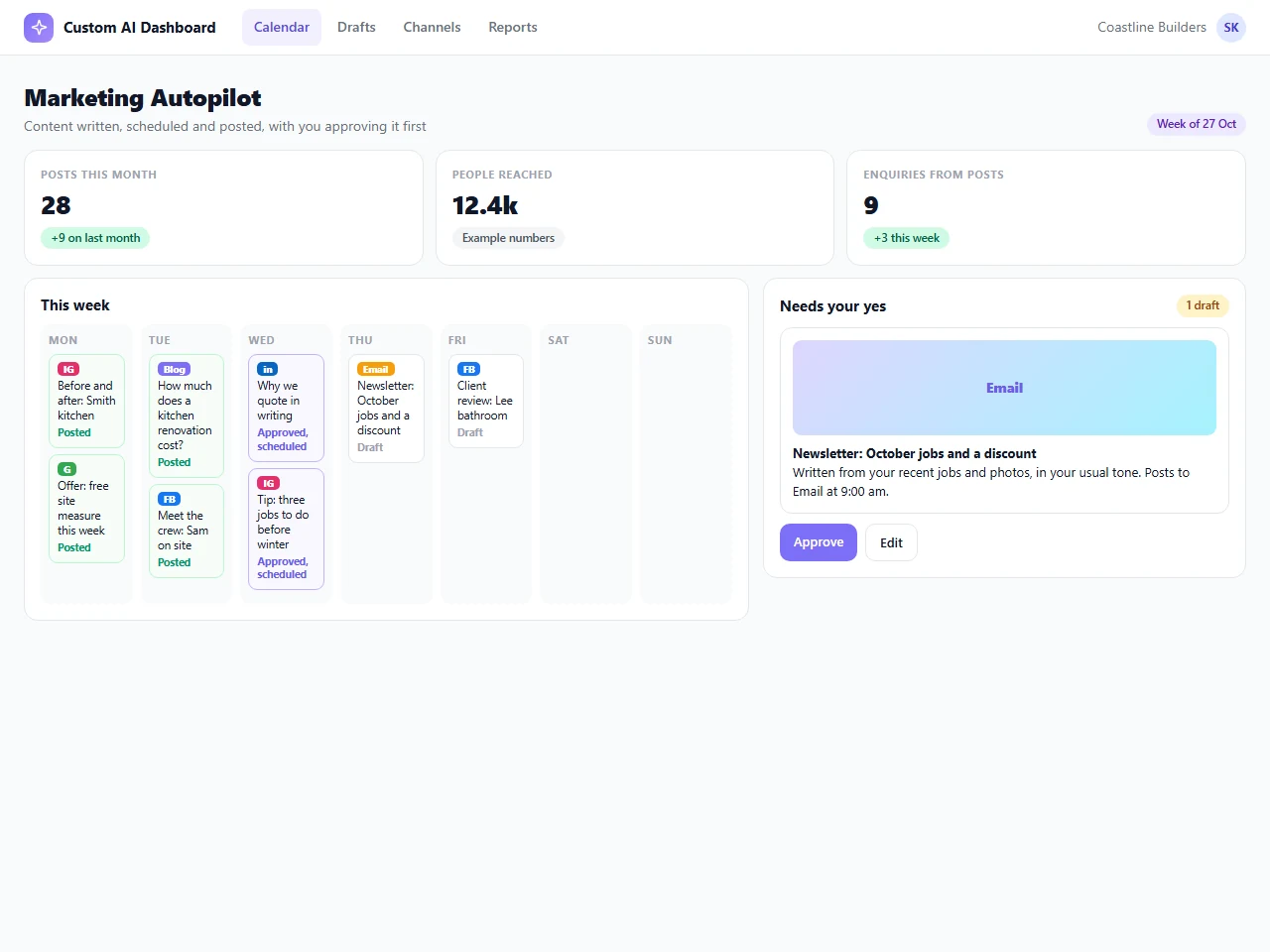
Your own version would show your channels and your wording. The useful part is the waiting column. A post that sits there until a named person says yes is what keeps an automatic tool from publishing something you did not mean to say.
If you want the wider picture of marketing jobs handed to software and people together, our automated marketing page sets out what is and is not automated, and the marketing dashboard page covers reading the results in one place.
What Buffer, Canva and Mailchimp list
These are the only prices we have read, from each supplier's own pricing page on 21 October 2026, in the currency the page showed. Nothing is converted. Each one charges by a different unit, so this is a map and not a ranking. Hootsuite and Later are not in the table because we have no saved reading for either.
| Tool | Free plan | Paid plans listed | Charged by |
|---|---|---|---|
| Buffer (posting) | Yes, up to 3 channels | Essentials $5 a month per channel; Team $10 a month per channel | channel |
| Canva (design) | Yes, up to 20 AI uses | Pro US$144 a year for one person; Business US$250 a year per person | person |
| Mailchimp (email) | Yes, 250 contacts | Essentials $18.80 and Standard $28.93 a month for 12 months | contacts |
Buffer is the one that is a scheduler. Because it charges per channel, the bill follows the number of accounts you connect: three channels are free, and a fourth starts the per-channel fee. The page said the price per channel falls above 10 channels but gave no figures. Our AI marketing tools guide holds the full read, including the AI limits on each plan.
What to ask before you buy
Free plans are generous enough that you can test a tool on your own posts before paying. Use that time to ask these questions, and write the answers down.
- Which channels does it reach, and how? Some accounts connect directly, others only send a reminder to your phone. Ask which kind yours is.
- What is charged by? Per channel, per person, per post or per contact. The unit decides how the bill grows.
- Can several people use it, and can one approve for another? A shared login is a risk if someone leaves.
- What happens to the queue if you stop paying? Ask whether scheduled posts still go out or are dropped.
- Can you export everything? Your drafts, your calendar and your results should leave in a file you can open.
- Where is the data held? Ask for the hosting country, because customer comments and names pass through it.
A supplier who answers these in writing is easier to rely on than one who points you at a general help page.
What to hand over, and what to keep
Handing the sending to a tool is sensible. Handing it the judgement is not. A good split keeps four things with a person.
- The approval. Nothing is published until someone reads it and says yes. This is the single setting that matters most.
- The replies. Comments and messages from customers are conversations. A tool can flag them, and a person should answer.
- The facts. Opening hours, prices, offers and dates change, and a post written last month can be wrong this week. Check the queue whenever anything changes.
- The login. Keep the account owner as your own business login, never a staff member's personal one.
What you can safely hand over is the repeatable work: assembling a draft from a product list, resizing a picture for each channel, choosing the quiet hour to post, and counting what went out. Our AI agents page describes workers that prepare this kind of draft, and each action waits for a named person to approve.
A ready-made tool, a spreadsheet or a custom one
A calendar and your phone. Free, and enough if you post a couple of times a week from one account. It fails the day you are busy, which is exactly the day a post matters.
A ready-made scheduler. The sensible default for most small businesses. It is tested by many other users, someone else keeps it running, and a free plan lets you try before paying. The cost to watch is the per-channel or per-seat fee as you grow.
A custom tool built with us. Worth a conversation only when your posting follows something a general scheduler cannot see. Examples are a stock list that should drive what you promote, a job board where finished work becomes a post, or an events diary. It is also an option when the schedule must sit inside a system you already use, as in custom software.
If a rented tool fits, use it. We will say so in the free assessment, because an answer that sends you to a free plan is still the right answer.
From a messy posting habit to a working routine
How we would approach it, step by step
This is the usual shape of any piece of marketing work with us. It makes no promise about how long a stage takes, because that depends on your channels and how quickly questions are answered.
- Free 20 minute assessment. You tell us how you post now. We tell you plainly if a free plan of a ready-made tool will do.
- Map the routine. One page showing the channels, who writes, who approves and what triggers a post.
- Choose the smallest fix. Often that is a ready-made scheduler set up well, with a checklist for the person approving.
- Quote in writing. If a build is worth doing, the scope, the connections and the running cost are set out before work starts.
- Build and check. We build it, run test posts to a private account, and show you what would have been published.
- Hand over. You get the working system, a short guide and a full export of your data.
The same pattern applies across our automation work, and the business systems audit maps what you already pay for before you add or build anything.
Where AI helps with scheduled posts, and where it does not
Many schedulers now offer an AI button that drafts a caption. Buffer's page, as we read it on 21 October 2026, listed an AI Assistant on all plans, with the Free plan capped at 5 reply suggestions a week. That is a drafting aid. It will produce words in a plausible voice, and the words can still be wrong about your business.
Where it helps is the blank page: a first caption from a product line, three variations to pick from, a shorter version for a second channel. Where it does not help is facts, tone with a regular customer, and anything touching a complaint.
Our approach is the same as on our other marketing pages. The tool prepares, and a person approves. If you want help with replies, AI review replies and AI email replies set out how drafts reach you for approval, and email marketing software covers the other half of reaching customers.
We make no claim that scheduled posting, with or without AI, will bring in more customers. It saves time and keeps a routine from lapsing.
Posting and being found are different jobs
A schedule keeps you present on the channels you already use. It does not make you appear when someone searches for what you sell. That is a separate job with its own tools.
If people mostly find you through a search engine, your time is likely to go further on pages that answer their questions. Our SEO automation page covers the checking and reporting that sit behind that, and the custom websites page covers the place where those pages live.
For many small businesses the honest order is to get the website right first, post steadily second, and only then ask whether a custom scheduler is worth building. If you are unsure which is holding you back, the business systems audit is a written look at where your time goes.
Your posts, your data and your accounts
A scheduler holds more than a calendar. It holds the passwords or permissions that let it post as you, the names in your comments and often your customer photos. That is worth a minute of thought before you connect anything.
If we build something for you, you own the code we write once it is paid for, and your data is yours with a full export whenever you ask. Nothing is posted, sent or changed until a person approves it, and each action is logged.
Ask for the hosting provider and country to be named in writing. Privacy and advertising rules differ between countries and we give no legal advice, so check the rules that apply to your posts. See our privacy policy for how we handle what you send us. If you also record who enquired from which post, a CRM can hold that, and form to spreadsheet is the simplest way to catch enquiries as they arrive.
Who this is for, and who it is not
It suits owner-run businesses and small teams that already post and want it to stop depending on memory: shops, trades, cafes, clinics, studios, agents and event suppliers. It suits people who can describe their posting routine in plain words and are willing to approve posts each week.
It does not suit a business that has not decided what it wants to say, because a scheduler only repeats the gap. It does not suit anyone after a guaranteed result, or a business with one account and one post a month, where a free plan or a calendar does the job.
Related work is on our pages for AI workforce, back office automation and dashboards, which handle the steps around the posting. For a comparison of what a custom route costs against renting, our rent or build guide gives the break-even sum.
Where we work
We are an Australian business and we also work with clients elsewhere. Tell us which channels and countries your audience is in, and we start from there. The free 20 minute assessment is booked through get started, and any build is quoted in writing before work starts.
Other guides and tools
- Automated marketing: marketing jobs handed to software, with a person approving
- SEO automation: the checking and reporting behind being found
- AI agents: workers that prepare drafts for your approval
- AI workforce: a team of AI workers under your control
- AI marketing tools guide: Buffer, Canva and Mailchimp prices, read 21 Oct 2026
- Email marketing software: the other half of reaching customers
- Email marketing pricing: what email suppliers charge, with dates
- Marketing dashboard: your marketing numbers on one screen
- AI review replies: drafts for your approval
- AI email replies: answers drafted for you to send
- Automation: alerts and repeat admin that fire on their own
- Custom websites: the place your posts send people to
- Custom software: built around how you work, quoted first
- Rent or build software: the break-even sum
- Business systems audit: a written map of your systems
- Business software help: which tools to rent, fix, build or leave alone
- All our tools: what is open and what we are building
- Compare hub: real prices side by side
- Pricing: StockRoom's plans
Start with a free assessment
Two short steps. Name and email, and tell us what is slowing you down. No card, no obligation.
Open your account now
- ✓ Tell us what to build and see what is inside your dashboard
- ✓ Your email confirmed, your phone number so we can ring you
- ✓ No card and no password to sign up
Where the numbers come from
- Buffer, Canva and Mailchimp: read from each supplier's own pricing page on 21 October 2026 and set out in our AI marketing tools guide. Mailchimp's introductory prices applied for 12 months and the page did not show the price afterwards.
- Hootsuite and Later: named as other rented options, with no price shown because we have no saved reading.
- Search size: Google Keyword Planner, read 13 October 2026, US market, a band of 1K to 10K monthly searches. It is a band, not an exact number, and we hold no Australian reading.
- Calendars and spreadsheets: no price page read.
- Our own prices: none are published. The only offer is the free 20 minute assessment; any build is quoted in writing before work starts.
Questions people ask
What is a social media scheduling tool?+
It is software that lets you write posts ahead of time and publishes them to your accounts on the days you pick. You plan a batch in one sitting instead of posting by hand each day.
Is there a free social media scheduling tool?+
Yes. Buffer listed a Free plan for up to 3 channels when we read its page on 21 October 2026. Check the supplier's own page, because plans and limits change.
How much does Buffer cost?+
Buffer listed Essentials at $5 a month per channel and Team at $10 a month per channel on 21 October 2026. It charges by channel, so the bill grows with each account you connect.
What do Hootsuite and Later charge?+
We show no price for either, because we have no saved reading we can stand behind. Check each supplier's pricing page for your number of accounts and users before you decide.
Will scheduling posts get me more customers?+
We cannot say, and we make no claim that it will. A schedule keeps you present and saves time, and whether that brings customers depends on what you post and who sees it.
Can you build a custom scheduler for my business?+
Yes, when your posting has to follow something a ready-made tool cannot see, such as stock or jobs. Any build is quoted in writing after the free 20 minute assessment, and nothing starts until you agree.
Will it post without my approval?+
No. Anything we build holds each post until a named person approves it, and every action is logged. You can add a rule to review certain posts by hand, such as offers or replies.
Do I own my posts and my data?+
Your data is yours, with a full export whenever you ask, and you own the code we write for you once it is paid for. Ask any supplier what their export contains.
Can AI write my social media posts?+
It can draft a first caption or a shorter version for a second channel, which a person then reads and changes. It can be wrong about your prices and hours, so every draft needs a check.
How many people search for this?+
Google Keyword Planner showed a band of 1K to 10K monthly searches for the phrase in the US, read on 13 October 2026. It is a band, not a precise number, and we hold no Australian reading.