One Model Over All Your Systems
A data platform reads your accounts, till, shop and spreadsheets into one set of linked records, shows where they disagree, and lets you ask questions of the whole.
Most firms with five or more systems also have a spreadsheet that holds it all together and one person who understands it. This page describes a different arrangement: your existing tools stay where they are, we read from them, match the same customer or product across all of them, and give you one linked set of records to ask questions of. It is built to order, and nothing ready-made is available to try today.
- ✓ Reads from your tools, replaces none of them
- ✓ Shows where your systems disagree
- ✓ A person approves anything that sends or changes
- ✓ Free 20 minute assessment, any build quoted first
Join and choose your tool
- ✓ Describe the tool you want and preview what your dashboard will hold
- ✓ Confirm your email and leave a number so we can ring you back
- ✓ No card and no password to sign up
Alternatives and their prices
Here is what the usual rented reporting routes cost, read from saved supplier pages. A reporting tool is not a platform: someone still has to connect the sources, match the records and check the results.
| Option | Price | Read on |
|---|---|---|
| A spreadsheet or template | $0, and your time every week | 22 Oct 2026 |
| Power BI Pro (Microsoft) | A$21.00 per user a month, billed yearly, before GST | Australian page, 12 Oct 2026 (US page US$14, 22 Oct) |
| Zoho Analytics | A$36.30 a month billed yearly, from 2 users, GST included; a free plan for 2 users | 13 Oct 2026; free plan 22 Oct |
| Metabase | Free open source to self-host; Starter $90 a month billed yearly plus $65 a user a year | 22 Oct 2026 |
| Odoo (all apps, one system for everything) | One app free; all apps A$34.40 per user a month for the first year | 22 Oct 2026 |
| Custom AI Dashboard | Quoted in writing after a free 20 minute assessment, built for what you need. | |
We hold no saved price for A person to match records by hand, so none is quoted here.
Prices are as each supplier's page showed them on the day read, in the currency it showed. We make no claim about which is cheaper: it depends on your team and what you need.
About this service
A data platform is the plain-word name for one place where the records from your different systems meet. Your accounting package knows who was invoiced. Your till knows what was sold. Your warehouse list or stock sheet knows what is on the shelf. Your online shop knows what was ordered. Each is right about its own corner and none can answer a question that crosses two of them, such as which customers who bought last quarter still owe you money and have stock waiting for them.
This is a decision page. It sets out the four layers we use (connect, clean, link, use), what you need before it makes sense, who it suits and who should do something cheaper, what it costs to think about before it costs anything to build, and the fair alternatives, including a spreadsheet, a rented reporting tool and doing nothing. If you only have one system, the honest answer is that you do not need this.
- ✓ A written list of every system and what it holds
- ✓ Records matched across systems, with disagreements flagged
- ✓ Screens and reports that read from the one set
- ✓ A log of where each figure came from
- ✓ Firms with five or more systems and one load-bearing spreadsheet
- ✓ Wholesalers, venue groups, trades with a shop, franchises
- ✓ Owners who cannot get one trusted number
- ✓ Not for a business with a single system, and health records need a separate first conversation
What a data platform is, in plain words
A data platform is a copy of the records you care about, gathered from your different tools into one organised set, so that a question can be asked once and answered from all of them. You may hear other names for the same idea: a single source of truth, unified business data, a data warehouse or master data. The words differ, and the job is the same.
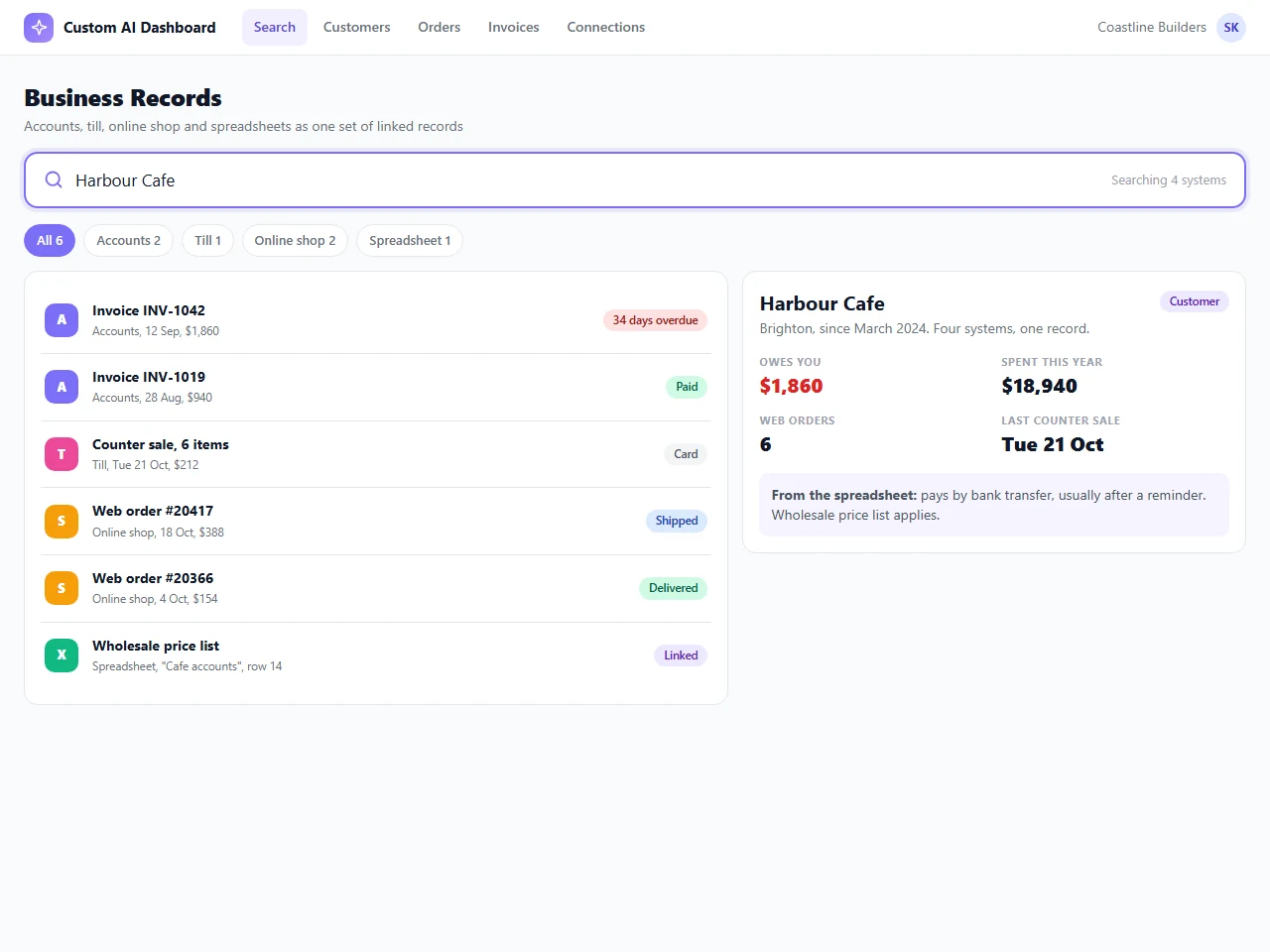
The picture above shows the idea on made-up data. One search box reaches the accounts, the till, the online shop and the spreadsheets together, and each result says which system it came from. Nothing in the picture is a real business.
It is not a new accounting package, till or stock system. Those keep doing their work. The platform sits beside them and reads, so the people using the till or the books do not have to change how they work on day one.
The problem it solves: five systems, five answers
Ask three people how many customers you have and you may get three numbers. The books count anyone invoiced, the till counts anyone who paid in person, and the online shop counts anyone who made an account. Some people are in all three under slightly different names, such as one spelling in the shop and another in the books. That is not carelessness. Each system was set up to do its own job, and none was asked to agree with the others.
The usual patch is a spreadsheet. Someone exports from each tool, pastes the results into one workbook and fixes the differences by hand. It works until that person is away, the export format changes or a formula breaks quietly. Our guides to fixing messy spreadsheets and moving from a spreadsheet to an app cover that stage.
A platform replaces the weekly hand job with a repeatable one. The matching rules are written down, run the same way each time, and show what they could not match, which is the part a hand job tends to bury.
The four layers: connect, clean, link, use
Every build follows the same four layers, whatever the systems are. The table shows what each does and what you can check at the end of it.
| Layer | What happens | What you can check |
|---|---|---|
| Connect | We read from each tool you already use, without replacing it | A list of every system, what it holds and how it is read |
| Clean | The same customer, product or supplier is matched across tools, and what disagrees is flagged | A list of the matches made and the conflicts left for a person |
| Link | One set of records: a customer, their orders, what they owe, what is in stock for them | One record you can open and follow into each source |
| Use | Screens for the people doing the work, reports, and agents that draft with approval | A screen or report built on the one set, not on an export |
The layers are done in order. Connecting first, with nothing changed in your systems, is the safe stage and the one that tells us whether the rest is worth doing. Our data integration services and system integration guides go into the technical side in plain words.
Connect: reading from the tools you already use
Connecting means getting a copy of the records out of each tool in a way the tool allows. Some systems offer a connection that software can use, called an API, and our guide to API integration services explains what that means. Some only export a file on request. Some hold data in a spreadsheet on a shared drive. Each is workable, and the method is written down per system.
We ask three questions of each one: who owns the account, what records it holds, and whether a connection is allowed under your agreement with the supplier. The third matters. Some suppliers limit what third parties may read, and we would rather learn that in the first conversation than after a build.
Read-only is the starting point. A platform that only reads cannot damage the tool it reads from. Writing back, for example to update a stock count, is added later for named tasks, and only where a person approves it. If the move is from an old system to a new one rather than a link between current ones, that is data migration, which is a different job with its own steps.
Clean: matching the same customer or product across tools
Cleaning is the unglamorous layer and the one that decides whether the answers can be trusted. The task is to recognise that "J Smith Plumbing", "Smith Plumbing Pty Ltd" and a customer with the same phone number in your shop are one customer, and that two stock codes for the same item are one product.
We write the matching rules in plain words you can read: same email, same phone, same address, or a close name plus one other match. Where a rule is sure, it links the records. Where it is not sure, it puts the pair on a list for a person to decide. We would rather ask you about fifty doubtful pairs than quietly merge two different customers.
Where your systems contradict each other, the platform shows both values and where each came from instead of choosing a winner. A price that differs between the till and the shop, or a customer address that differs between the books and the delivery list, is a finding about your business, not a defect to hide. Our data clean-up guide covers the same work for a single messy file.
Link: one record for a customer, an order or a product
Linking turns the matches into records you can open. Open a customer and see their invoices from the books, their purchases from the till, their orders from the shop and their notes from your sheet, in one place, each marked with its source. Open a product and see the stock count, the supplier, the recent sales and what is on order.
This is where the cross-system questions become easy. Which customers have an overdue invoice and an open order? Which products sell in the shop but are never counted in the warehouse list? Which supplier appears under three names? None of those questions can be asked of any one tool, and each is a single query once the records are linked.
Every figure keeps a trail back to its source record, so when two numbers disagree you can see which system said what and when it was last read. The link layer never edits the source: it points at it. If you later choose to replace one tool, the links to the others stay, which is one reason people do this before a legacy software modernisation rather than after.
Use: screens, reports and agents on the one set
The last layer is where people feel the difference. With one set of records you can build the things that were too much work to keep up by hand.
- Screens for the people doing the work. A counter screen showing a customer's whole history, or a morning screen showing what needs chasing.
- Reports. The same report from the same source each week, produced by report automation instead of by pasting.
- Dashboards. Live views on the linked set, built as custom dashboards or a KPI dashboard, which show where each number came from.
- Search across everything. One box that finds a customer, an invoice or a product in any source, which is the idea behind AI document search.
- Agents that draft with approval. An AI agent can read the linked records, draft a reminder or a reorder and hand it to a named person. Nothing is sent, ordered or changed until that person approves it.
You choose which of these you want, and you can start with one. The platform is the foundation, and the use layer is built on it one piece at a time.
Where your data lives, and who owns it
Your records are yours. You own the code we write for you once it is paid for, and your data is yours with a full export, so a platform built with us is not a cage. Before you agree to anything we write down where the combined set is stored, which country it sits in and who can reach it.
The copy of the data is a working copy. The original stays in each tool, and the platform reads it again on a schedule agreed in the quote. If the platform is switched off, your tools carry on exactly as before.
Privacy and consent rules differ between countries and we give no legal advice, so check the rules that apply to your customers' details. Our privacy policy explains how we handle what you send us. Anything that holds health information is a separate conversation first, because the rules and the risks are different and the answer may be that it should not be combined at all.
Who it suits, and who should do something simpler
It suits a firm with five or more systems and a spreadsheet that everyone depends on: a wholesaler with a warehouse, a till and a customer portal; a group of venues with separate tills and one head office; a trades business with a shop and a job list; a franchise with a different setup in every location. See also our guides to multi-venue hospitality software, franchise management software and buying group software.
It does not suit a business with one system. If your books, stock and sales already sit in one package, a report from that package is enough. It does not suit a business that cannot yet say what its systems are, and for that the business systems audit is the first step. And it does not suit anyone expecting the platform to fix bad habits, because it makes disagreements visible but a person still has to decide what the right answer is.
For a business with two or three tools, a workflow automation rule or a single custom dashboard is usually the better and cheaper place to begin.
How a build usually goes, step by step
This is the usual order, not a promise about how long any stage takes, which depends on how many systems you have and how tidy they are.
- Free 20 minute assessment. You tell us what you cannot answer today. We tell you plainly if a report from one tool, a rented product or a spreadsheet will do.
- A business systems audit. A written map of your systems, spreadsheets and routines: what each holds, what is duplicated and what disagrees. It is scoped and quoted in writing before it starts, and it tells both of us whether a platform is worth building.
- A written quote for the build, with the systems, the layers and the running cost shown separately.
- Connect, read-only, one system at a time, checking each against a few records you know.
- Clean and link, with the doubtful matches sent to you for decisions.
- Use, starting with the one screen or report you named at the start.
- Review, then extend. Each new system or screen reuses the same set of records.
Nothing begins until you agree to the quote.
From scattered systems to one set of records
What you get at the end
At the end of a build you have the working platform and the papers that let you keep using it without us.
- A list of every system connected, what it holds, how it is read and who owns the account.
- The matching rules in plain words, with the list of conflicts still waiting for a decision.
- The linked records, with a trail from every figure back to its source.
- The first screen or report you asked for, built on the one set.
- A log of what was read and when, so a wrong number can be traced.
- A short guide to adding a system, changing a rule and switching the platform off.
We give no accuracy figure, because accuracy depends on how consistent your records are, and the honest test is a sample of your own customers and products that you already know the answers for.
Limits and risks
Be wary of anyone who sells one source of truth without naming its limits. These are the ones we plan around.
- It shows the mess before it fixes it. The first result is often a long list of conflicts, which is a finding, not a failure.
- A supplier may limit access. Some tools restrict what outside software may read, or charge for a connection. We check before we quote.
- The copy can fall behind. The platform shows data as of its last read, and each screen says when that was.
- Wrong matches are possible. Two different customers can look alike. That is why doubtful pairs go to a person.
- Costs run on after the build. There is a monthly running cost for hosting and any connections, and the quote shows it separately.
- We make no promise of results. We do not claim a platform will save time or raise sales, because that depends on your business and we hold no figure from our records to support it.
An example may help, as an illustration and not a customer: a wholesaler with a stock sheet, an accounting package and a customer portal might ask which accounts are overdue while their stock is on hold. That is one question across three systems.
A fair comparison: a spreadsheet, a rented tool, a bigger system, or this
Keep the spreadsheet. For two or three tools and one person who keeps it right, it is entirely reasonable and it costs only time. The risk is that it lives in one person's head.
Rent a reporting tool. Products such as Power BI, Zoho Analytics and Metabase connect to many sources and draw charts, and the prices we have read are in the table below. They give you views of data. They do not by themselves decide that two customers are the same, which is the cleaning layer, so someone still has to do that work. Our guides to business dashboard software compared, Power BI against a custom dashboard and business intelligence consulting set those routes out.
Move to one bigger system. Replacing everything with a single package, as in our ERP software compared guide, removes the disagreements by removing the separate tools. It also means changing how everyone works, which is often the larger cost.
Build with us. Worth considering when several systems must stay, the matching is the hard part, or no product fits. Our rent or build guide gives the sum, and our data engineering services guide helps you judge any quote, ours included.
Areas we cover
We are an Australian business and we also work with clients elsewhere. Say which country's rules your records fall under and which systems you want joined, and we start from there. The free 20 minute assessment is booked through get started, and any build is quoted in writing before work starts.
Guides, prices and tools to read next
- Data integration services: joining systems and what to ask a supplier
- Data clean-up: tidying a messy file before you link it
- Data migration: moving from an old system to a new one
- Data engineering services: pipelines and how to judge a quote
- Data analytics services: what to ask of your numbers once they agree
- API integration services: how software talks to software
- System integration: connecting the tools you already pay for
- Fix messy spreadsheets: when the workbook has become the system
- Spreadsheet to app: moving the sheet into something safer
- Business systems audit: a written map of your systems
- Custom dashboards: how sheets, accounts and the till come together
- AI agents: workers that draft on your data, with you approving
- AI workforce: one AI worker per role
- Back office automation: jobs, tasks and quote to invoice by rules
- Automation: alerts and repeat admin that fire on their own
- Rent or build software: the break-even sum
- Custom software: built around how you work, quoted first
- CRM: where your customer records can live
- StockRoom: stock control, free to 50 products
- Compare hub: real prices side by side
- All our tools: what is open and what we are building
- Spreadsheet alternative: stay, move to a database or build
- Predictive maintenance software: readings turned into warnings
- Demand forecasting software: what to stock next, from your own sales
- Operational dashboard: the day on one screen
- Xero integration developer: what to ask before connecting Xero
Start with a free assessment
Two short steps. Name and email, and tell us what is slowing you down. No card, no obligation.
Choose your tool and begin
- ✓ Tell us what to build and see what is inside your dashboard
- ✓ Your email confirmed, your phone number so we can ring you
- ✓ No card and no password to sign up
How we found these figures
- Power BI Pro: A$21.00 per user a month billed yearly, before GST, on the Australian page read 12 October 2026; US$14 on the US page read 22 October 2026.
- Zoho Analytics: A$36.30 a month billed yearly from 2 users, GST included, read 13 October 2026; the free plan for 2 users read 22 October 2026.
- Metabase: free open source to self-host; Starter $90 a month billed yearly plus $65 a user a year; read 22 October 2026.
- Odoo: one app free, all apps A$34.40 per user a month for the first year; read 22 October 2026.
- A person to match records by hand: not read, so no wage figure is given.
- Search volumes: none are quoted, because none were read for this page.
- Our own prices: none are published. The only offer is the free 20 minute assessment; the audit and any build are quoted in writing before work starts.
Common questions
What is a data platform?+
A data platform is one organised set of records gathered from your different tools, such as accounts, till, shop and spreadsheets, so a question can be asked once and answered from all of them. Your original tools carry on as before.
Do we have to replace our software?+
No, because the platform reads from the tools you already have and leaves them in place. Replacing a tool is a separate choice that you can make later, and the links to your other systems stay in place if you do.
How is this different from a dashboard?+
A dashboard is a view, and a data platform is the linked records underneath it. A dashboard built on one tool shows that tool only, while one built on the platform can show customers, orders and stock together.
What is a single source of truth?+
It means one agreed place to look for a fact, such as how many customers you have or what a customer owes. It does not delete the other copies, and it shows where they differ so a person can decide which is right.
How much does it cost?+
We publish no price, because the cost depends on how many systems you have and how tidy they are, and any build is quoted in writing after the free 20 minute assessment and the audit. Nothing starts until you agree to that quote.
Do we need a business systems audit first?+
We recommend it, because the audit is a written map of what each system holds and where they disagree, and it tells us both whether a platform is worth building. If you already have that map, we can start from it.
Can it handle health or other sensitive records?+
Anything that holds health information is a separate conversation first, because the privacy rules and the risks differ, and the answer may be that those records should not be combined at all.
Will it change anything in our accounts or till?+
Not at the start, because it begins read-only and cannot change the tool it reads from. Writing back is added later for named tasks only, and a person approves each kind before it is switched on.
Who owns the data and the code?+
Your data is yours, with a full export, and you own the code we write for you once it is paid for. We write down where the combined set is stored and which country it sits in before you agree.
What if one of our systems will not let software read it?+
Some tools only export a file, and some limit outside access. Either can still work with a scheduled export. We check this for each system in the audit, so you learn it before you are quoted.
Is it worth it for a small business?+
It can be when you have five or more systems and a spreadsheet everyone depends on, and it is not worth it for a business with one system. The assessment is free and we will say if a simpler route is better.